Changelog

What's new

New workflows, meaningful improvements, and fixes you will notice. Updated weekly. For technical release notes and downloads, use the release archive.

v0.15.1: bring your chats over, share with your team, and a native mobile app

Orchestrator v0.15.1 imports your earlier Claude Code and Codex chats, shares Cloud sessions and projects with people and teams, puts every artifact in one list with one-click Publish, and ships a native mobile app with Orchestrator Cloud. The preview build adds forking a session and rolling back files.

Stable v0.15.1 is out. It follows v0.15.0 from November 13 with one fix, so this entry covers both. You can now bring the chats you already had with Claude Code or Codex into Orchestrator, share Cloud sessions and projects with your team, and find every artifact in one list with one-click Publish. Orchestrator for iOS and Android is rebuilt with native controls and runs Orchestrator Cloud sessions from your phone. In the preview build, you can fork a session at any turn and roll back the files along with the chat.

Bring your earlier chats into Orchestrator

Chats you already had with Claude Code or Codex on this computer can now come into Orchestrator, so you keep going where you left off instead of starting over. Start from Bring your earlier chats into Orchestrator on Home, Import chats… in project settings, the offer on an empty project board, or Settings › Harness for a single chat. On a Mac, import also finds Claude Code and Codex chats kept by another desktop coding app, including archived workspaces, and your agent can move that app's project settings over when you ask. Long import lists scroll, and import errors show next to Import. #6364 #8059 #8185

An empty project finds four earlier chats in its folder. Review them, leave one out, import the other three, then open an imported Claude Code chat and keep going: the agent still has the earlier conversation.

Share Cloud sessions and projects with your team

Orchestrator Cloud sessions and projects can now be shared with people and teams, not only by link. Share opens one dialog: add people by name or email, or a whole team, choose their access, and see who has access and why, from the owner down to teams and invited emails. General access says in one sentence who a link lets in. Links start at Can watch, Can write asks first, and Link settings sets how long new links last and revokes old ones. Settings › Teams lists your teams, where you can rename them, manage members and see what's shared with them. #7511 #7888

In a Cloud session, Share is one button, and Cloud project settings have a Sharing page for the whole project. Files in another member's session are view only: you can open and read them, but not edit, delete, download or copy them. On a shared project's orchestrator, its pull requests and merge requests sit in a header control next to Share instead of floating over the conversation. #8124 #7665 #7810

Share a Cloud session with a team: add the team with Can watch access, then turn on link access and copy the link.

One Artifacts list, and Publish in one click

The Artifacts page is now a single list, newest first, with each row naming its project and session. Filter by All, On this machine or Cloud, by project, type or sharing, switch to list view, or choose Select to delete several artifacts at once. Share is now Publish: one click publishes an artifact and shows its link, and when the file changes the button reads Republish and updates the same link. #8148 #8073 #8093

When a turn creates or edits an artifact, the chat shows a preview card under the reply, marked Created or Edited, and new artifacts open in the session's Artifacts tab instead of taking over the Browser. Lists now hold only the files an agent registers as deliverables with ao artifact add, so a page and its 50 images count as one artifact, and files an orchestrator writes show up too. #8120 #8174 #7855 #8118
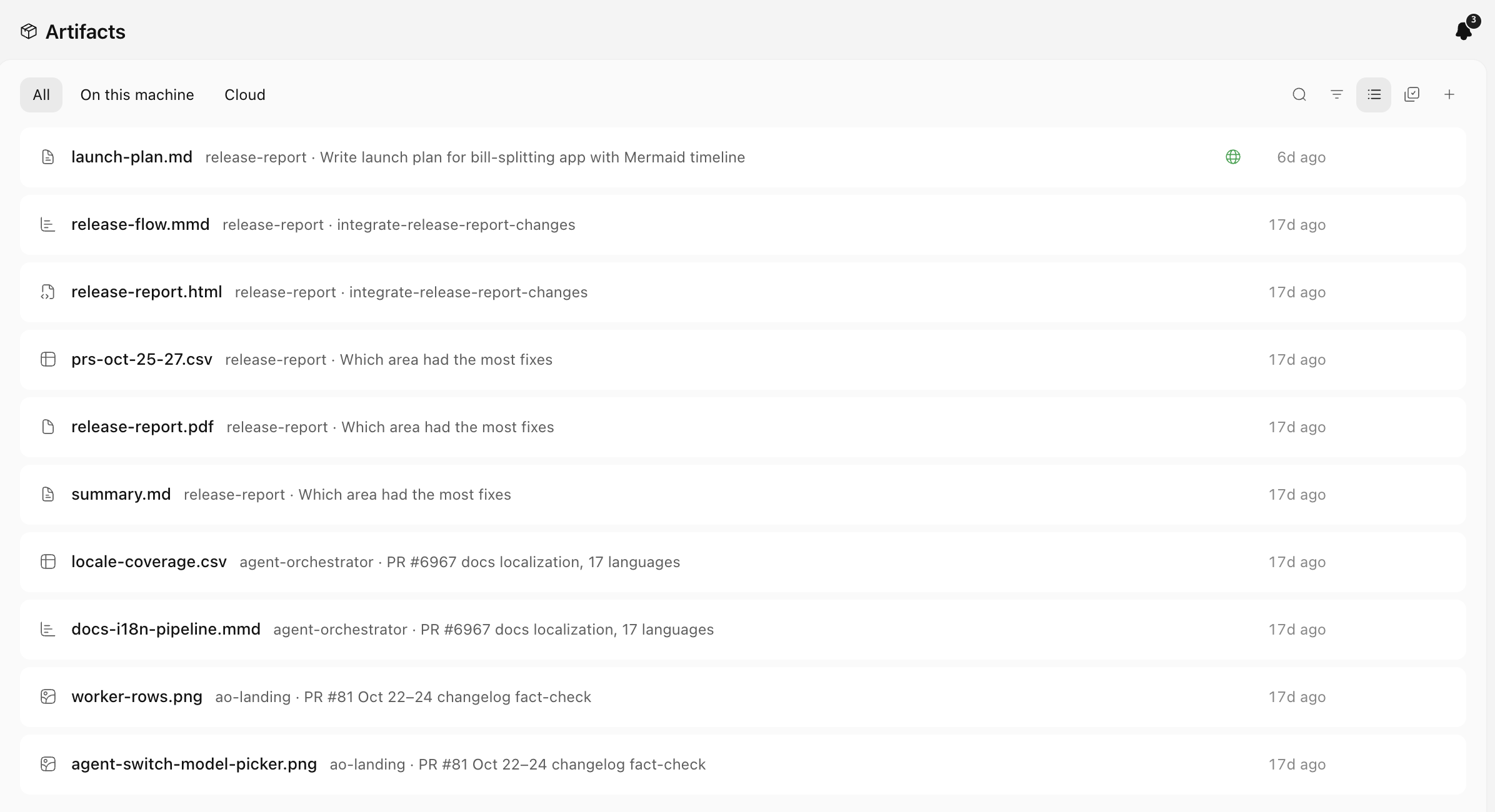
The Artifacts page as one list, newest first, with All, On this machine and Cloud filters. The published launch plan carries a globe mark.The Artifacts page as one list, newest first, with All, On this machine and Cloud filters. The published launch plan carries a globe mark.

A native mobile app, with Orchestrator Cloud on your phone

Orchestrator 2.4.0 for iOS and Android is rebuilt with native controls: tabs, the Workers board, New task, chat, Settings, Machines, the terminal, Files and previews. Sign in under Settings › Machines to start, chat with, rename, pin and stop Orchestrator Cloud sessions next to your paired computers, and connect Claude and ChatGPT to Cloud by signing in through your browser instead of copying a code. #7838 #7839 #8085 #8086

Pairing now uses a one-time code that works once within 10 minutes, so each phone or computer gets its own access that you can revoke on its own. In Connect mobile on the desktop, Regenerate is now Revoke all devices, and adding a remote host also accepts a pairing code. Version 2.4.0 is in the App Store and on Google Play. #8081 #8083 #8082
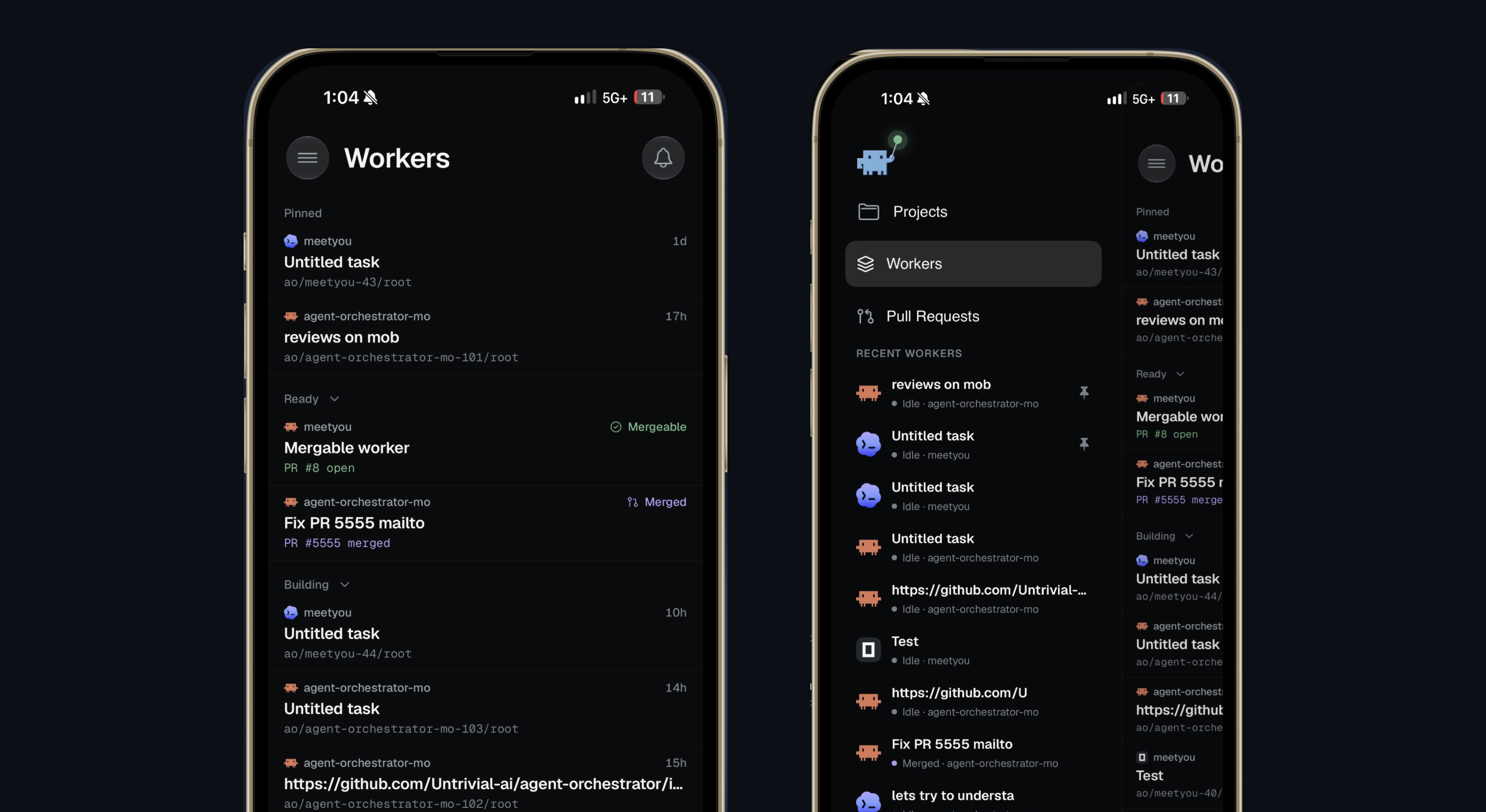
Orchestrator 2.4.0 on iPhone: the native Workers board, and the menu with Projects, Workers and Pull Requests.Orchestrator 2.4.0 on iPhone: the native Workers board, and the menu with Projects, Workers and Pull Requests.

Improvements

Now in stable

These were in last week's preview build and are now in stable v0.15.0.

  • Add more than one Claude Code or Codex account under Settings › Harness › Claude Code or Codex › Account, choose a default, and see each account's usage limits. Orchestrators have a Summary tab with the same account picker, so one that hits its limit can keep going on another account. #7899 #7978
  • The artifact viewer zooms and pans, and image, PDF, video and audio artifacts have version history you can preview and restore. #7814 #7875
  • Tool calls to MCP servers read in plain words, such as "Previewed the page" or "Clicked", instead of raw tool names. #7956
  • Chats on a remote host open in under a second and stay readable while the host is offline, and reopening a Cloud chat shows the conversation right away. #7789 #7935
  • Settings › General › Sessions › Terminal shell picks the shell for new terminals. Right-click any tab in a session's tab strip for actions that fit it; its ⋮ menu lists the same rows. #7874 #7877 #7955
  • The orchestrator buttons show a dot when the orchestrator has replied and you haven't looked yet. On macOS, the top bar's commands are also in the menu bar with their shortcuts. #7969 #7971
  • The Clone a Git repository dialog shows live progress, and an archived chat offers Restore session instead of a Resume agent that failed. #7860 #7898
  • A task can be up to 100 KiB, a pull request's status updates within seconds when its agent changes it, and cancelled checks no longer count as failing CI. #7298 #7964 #8000

Chat

  • Find in chat (Cmd+F on macOS, Ctrl+F on Windows and Linux) searches the whole conversation, including messages that aren't loaded on screen, with a match counter and next and previous. You can change the shortcut in Settings › Shortcuts. #7684
  • Chat steps say what each one did, such as "Read README.md", "Ran tests" or "Created branch feat/x", instead of "Ran command" for most things, and tool calls stay collapsed until you open them. Spawning, renaming and archiving agents fold into Worked for, and Agent Reports collapse into one line that counts reports and the ones that need you. #7840 #8052 #7822
  • Agents no longer show Orchestrator's own CLI commands in the chat; steps read as what they did, such as "Previewed hello.html". #8156
  • Your own messages render light markdown: lists, task boxes, bold and italic, code, links and quotes. In the composer, Shift+Return continues a list and Tab nests an item, and skills and files you send show in the accent color. #8064 #8062
  • Editing a sent message happens in its own bubble, so nothing on the page moves, and attachments on a sent message show as one row of small tiles above the bubble. #7858 #8056
  • Add to chat captures exactly what you selected, including formatted text, code and diagrams, and a selection in the diff viewer no longer disappears while the session is streaming. #7850 #7512
  • A chat reopens where you left it in its history instead of jumping to the bottom, and chats that were idle come back faster. #8261 #8101
  • Images in a page an agent shows in chat open at full size, and the chat image viewer uses the whole window. #7901
  • Agents know your local time zone and give times in it instead of repeating UTC timestamps. #8152
  • In the preview build, Roll back to here also restores the worktree files to how they were before that turn, and the confirmation lists every file that will change. You can also fork a session at any turn: Fork on a turn or Fork session in the session's menu starts a new session with its own worktree and the conversation up to that point. #7585 #8111
  • In the preview build, selecting text in a chat opens an inline comment box, and numbered badges mark each annotated selection; the comments go to the agent next to the text they refer to. Add selection to chat can be rebound in the keyboard shortcuts window. #8340 #8435 #8284
  • In the preview build, you can steer a running turn on Qwen Code, Kimchi, OMP, Antigravity and Hermes: a message sent mid-turn joins the turn instead of waiting in the queue. #7702 #8016 #8022
  • In the preview build, when a message fails because the agent is signed out, a band above the chat box offers Log in, and your message sends once you're signed in. #7769
  • In the preview build, the / and @ menus are compact, skills show by a readable name with a one-line description, and web links show the site's favicon. #8313 #8409 #8332
  • In the preview build, Resolve conflicts and Update from base show in the chat as your own action, with the conflicting files listed. #8404

Sessions and sidebar

  • The board's Archive opens a searchable archive over the page you're on: type to filter by title, branch, PR number, project or agent, and use the arrow keys to move. A project's ⋮ menu in the sidebar also has Archive. #8065 #8092 #8133 #8234
  • Kanban statuses match what is happening: Orchestrator's own reviews stay in Validating, In review holds only PRs waiting on a person, and Ready holds only PRs that can merge. #7503
  • Terminal sessions and shell tabs take the title their program sets, so a tab running Claude Code or Codex reads the task topic. Names you set yourself still win. #8018
  • The sidebar footer is one row: your account on the left, and a Mobile menu (Connect mobile, Stay Awake) and Settings on the right. #8161
  • In the preview build, Cmd+K searches every past session and opens one scrolled to the matching message, and agents can run the same search with ao search. Cmd+K also opens shorter, focused on the current project or session. #7362 #8410
  • In the preview build, the sidebar's Scratchpad section is called Sessions and sits above Projects, always with its + button, and the archive is labelled Archived sessions everywhere. #8323 #8318 #8294
  • In the preview build, session cards show a branch by its topic, removing a project takes it out of the sidebar right away, and starting a review keeps you on your current tab. #8301 #8275 #8347

Artifacts

  • The Summary tab previews your newest artifacts as thumbnails, lists the rest newest first, and a worker's inspector always shows its Artifacts tab when it has artifacts. #8044 #8032 #8011
  • After you publish an artifact, your agent can find its public link, for example to add it to a pull request. On mobile, a published artifact shows its link with Share link and Copy link. #7966 #8028
  • Video artifacts show a preview frame instead of a grey placeholder, and gallery previews load faster after the first view. #7671 #8071
  • The artifact preview window has a slimmer header, and Scratchpad files can be shared from it. #8043
  • In the preview build, the publish panel opens at once, every list marks a link as public or restricted, and a changed published artifact shows a single Republish button in its header. #8302 #8349
  • In the preview build, the Artifacts page and a session's Artifacts tab stay fast with hundreds of artifacts. #8339

Desktop

  • The new tab bar is on for everyone: pill-shaped tabs, a + for a new terminal after the last tab, and a quieter set of actions. The session tab always shows its ⋮ menu, and middle-click closes terminal and file tabs. #8077 #8079
  • Clicks in the terminal reach programs that use the mouse, such as Claude Code's panels. Hold Option (Shift off macOS) to select text, or choose Settings › General › Terminal clicks › Always select text. Terminal tabs show the agent running in them with its live status. #8141 #8276
  • The Automations page is redesigned: starters stay at the top, and your list gets All, Enabled and Paused filters with counts, search, a project filter and sorting. Schedules read in plain language. #8088
  • A new, consistent icon set and control style across the app, and a redrawn app icon with a Liquid Glass version on macOS 26. #7903 #7999 #7970 #8069
  • The update row in the sidebar shows download progress, links to the release notes, and offers a retry when an update fails. The app also opens faster, without waiting on a network check. #8020 #8165
  • The app, its CLI help, agent prompts, error messages and the tray use the Orchestrator name throughout, in all nine languages. #7685
  • In the preview build, Report a problem opens a chat with an agent that writes the bug report with you, instead of a form. #6984
  • In the preview build, idle Browser tabs of sessions you aren't looking at are throttled, leftover temporary browser profiles are cleaned up, and ao-app://sessions/<project>/<session> links open the app on that session. #8400 #8407 #8047

Agents and accounts

  • New Claude Code reviews run in Chat when it's available, and that reviewer is read-only, so it can't write to the worker's branch. #7253
  • The account chip in the composer shows when you're near a usage limit, and limits now show how much you've used, for example "Session 78% used". #8231 #8272
  • In project settings, each agent row reads Agent · Model · Effort, with reasoning effort in its own picker. If a terminal runs a different ao than the app's own CLI, Settings › General › Advanced says so and Use this app's ao fixes it. #7952 #7783 #8039
  • In the preview build, Claude Code and Codex Chat sessions can move to another signed-in account when they hit a usage limit: turn on Move to another account at a usage limit in the agent's Account settings. #7534
  • In the preview build, subscription accounts work on remote hosts, with an Account row in the agent picker, and ao account lists and switches accounts. #8253 #8355
  • In the preview build, each agent's Account tab lists sign-in methods and API keys separately, saves a provider API key once and checks it, and explains a failed account check in plain words. #7312 #8365
  • In the preview build, Grok Build can run as a Chat session, with model and effort controls, permission prompts and session continuation. #8298 #8278

Remote hosts and Cloud

  • When a remote host is offline, its board keeps the last saved copy and shows Offline, when it was last updated, and Retry. #8222
  • Remote host passwords are stored encrypted, and opening a host's tunnel address in a browser no longer locks your phone out. #8038 #8027
  • In the preview build, Cloud sessions gain more of what local sessions have: archive from the tab menu, terminal Restore, shell tabs remembered across restarts, file tabs, automations, notifications and PR conflict handling. #8341
  • In the preview build, the Share dialog drops its Workspace members row, and Share in an orchestrator session shares the whole project. #8307

Mobile app

  • An artifact opens in a viewer you can swipe through, with a filmstrip of the session's artifacts, and the viewer previews video and audio, PDFs on Android, CSV and TSV tables, and Mermaid diagrams. A turn's artifacts show as preview tiles under the reply. #7681 #8098 #8235
  • Files can compare against another branch or the PR, and show uncommitted, staged, unstaged or single-commit changes. #8224
  • Add local projects to a paired computer from New project, and New task opens with the project you last worked in. #8240 #8140
  • Android uses the same board layout as iOS, and Pull Requests is a grouped list with one status per PR. #8154 #8218
  • Attached photos and files show as thumbnails in the composer, and pasting an image into New task attaches it. #8153 #8226
  • A Workers board with nothing running shows an idle screen with Archive pinned and a New agent button. On an iPad with a hardware keyboard, Return sends and Cmd+Return steers a running turn. #7506 #7666

Developer mode previews

These need Settings › General › Advanced › Developer mode.

  • A Usage page shows what your agent sessions cost, the tokens they used and how much of each subscription is left. Open it from Usage in the sidebar. #7148 #8097 #8112
  • New projects can pick their worker and orchestrator agents for you, starting with an installed, signed-in agent. #8252
  • /btw opens a side chat on very long conversations instead of failing. #6599
  • In the preview build, with PR view on, a pull request opens in its own tab beside the chat, with its description, comments, checks, reviewers and stack, plus Merge. #7394 #8336
  • In the preview build, with Split panes on, every pane has a title bar you can drag, and agents can arrange your tabs with ao pane. #8273 #7873
  • In the preview build, in Chrome mode, agents can work in their Chrome tab while its window is covered or minimized. #8396

Bug fixes

Chat

  • Claude chats recognize Claude Code's new usage-limit messages again, so they show the limit notice and resume when it resets instead of a generic error. #7991
  • A chat waiting on a question no longer gets stuck after Orchestrator restarts. #7919
  • When an agent stops mid-turn, the turn ends with "The agent stopped before this turn finished" instead of spinning forever. #8171
  • Chat does much less work while an agent replies, so long conversations stay responsive, and switching sessions no longer freezes the sidebar. #7988 #8013
  • Switching between chats no longer replays fade-ins and scrolling for content that was already there. #8067 #8233
  • Steering a queued message moves it out of the queue at once, a steered message no longer seems to vanish, and attachments show in your message the moment you send it. #7963 #8049 #8184 #8063
  • While a chat moves to another Claude account you can keep typing, and an expired Claude login asks you to log in again instead of showing a raw error. #7992 #7993
  • Link hover cards finish loading within about 3 seconds, and a chat link to a file an agent saved as an artifact opens that artifact. #8001 #8045
  • Review comments forwarded to the chat render GitHub's HTML instead of printing the tags, and the "Answered by … instead of …" row no longer appears for model aliases that resolve as expected. #8150 #8214
  • Copy image, Save image and Open in Orchestrator Browser work in chats on a remote host. #8151 #8239
  • In the preview build, messages sent in quick succession while the agent works are all sent, and messages queued behind a stalled turn run when it times out. #8248 #8297
  • In the preview build, a chat whose Claude Code session was lost shows as exited and can be resumed, and Claude Chat shows the model's real context window from the first turn. #8195 #8041
  • In the preview build, after switching a chat from Claude Code to Codex, the composer shows Codex's model. #7790 #8320
  • In the preview build, orchestrator chats keep messages in order, the first message no longer jumps on macOS, and clicking into the Browser or a terminal no longer sends your typing to the chat box. #8384 #8324 #8418
  • In the preview build, opening a session no longer flashes an error under the model picker, and OpenCode Go models stay selectable. #8394 #7307

Sessions and pull requests

  • Starting a session is more reliable: setup gets up to 120 seconds, stale model settings can be reset, and automatic starts pause after three identical failures. #8119
  • Claude Code sessions that compacted can switch from Terminal to Chat again, and a Hermes chat with messages can switch to Terminal. #8026 #7740
  • You can unpin a remote host's session even when that host is offline. #8094
  • In the preview build, an orchestrator acknowledges worker reports that Claude Code wraps as pasted content, so the same report no longer comes back. #6387
  • In the preview build, a CI job that failed only because its run was cancelled counts as cancelled. #8149

Agents

  • Auto review works again on tmux 3.5 and newer, and running a Claude Code review again with a new setting no longer fails. #7315 #8212
  • Agents installed with npm, nvm, fnm or Volta no longer show "Installation check failed" when the app is opened from the Dock. #7922
  • Codex with a custom model provider no longer shows as signed out. #7959
  • With OpenCode 1, answering a prompt clears Needs You right away, and OpenCode subagents no longer take over their parent session. #7596 #7597
  • Antigravity sessions respect the Auto and Accept edits permission modes, and Command Code sessions keep conditional git config behind a symlink. #8066 #8144
  • In the preview build, Settings no longer lists the same Claude Code login twice. #7674

Desktop and remote hosts

  • Cloning a GitHub repository from "Let's set up your first project" works again. #7927
  • Update notes for a stable release show that release's own notes, and their links open in your browser. #8110 #8183
  • The Browser panel no longer goes blank while a menu is open, and the maximized Browser runs edge to edge. #8173 #8074
  • The center pane can no longer be pushed sideways, and archiving a session with uncommitted changes no longer leaves a cut-off error in the top bar. #8024 #8055
  • Pasting into Find in terminal puts the text in the box, Add feedback works on a rendered HTML artifact, and Edit file opens again for Cloud artifacts. #7882 #8012 #8048
  • ao remote-host link falls back to a temporary tunnel address instead of failing. #7977
  • In the preview build, a remote host's chat box stays open while the host reconnects, and a failing file stream no longer leaves sessions stuck. #7431 #8304 #8176
  • In the preview build, in Cloud Chat, the approval menu changes the approval mode, New Task lists Cloud's own models, and sending while scrolled up brings you to your message. #8287 #8288 #8292
  • In the preview build, the bundled ACP Node runtime is updated to 22.23.5 for Node's security fixes. #8196

Mobile app

  • The open chat stays on screen when you switch apps, switching between Chat and Terminal shows one loader, and Android scrolling is smoother. #7688 #7908 #7950
  • Connect manually keeps the keyboard open on iOS and accepts a host with its own port. #7906 #7995
  • A long approval command scrolls inside its card, the Android mic button no longer turns blank, and saving a machine's name no longer crashes on Android. #7797 #7887 #7943
  • Machine renames sync without signing out, a multi-route Cloud machine no longer reconnects every 30 seconds, a Default-model task starts, and failed MCP servers show as a short note. #7990 #7794 #7996 #8037

Learn more

Changes not marked as preview are in stable v0.15.1, released on November 14, which builds on v0.15.0. Preview items require the November 14 preview build. The mobile app changes are in Orchestrator 2.4.0 for iOS and Android.
v0.14.10: Orchestrator Cloud for everyone, a new sidebar, and automation templates

Orchestrator v0.14.10 opens Orchestrator Cloud to everyone, redesigns the sidebar with pinned projects and a lighter theme, and adds automation templates, public share links and Hermes Agent. The preview build lets anyone switch Claude Code and Codex accounts.

Stable v0.14.10 is out, and Orchestrator Cloud is open to everyone: sign in and your agents run in their own hosted workspaces instead of on your computer. The sidebar is redesigned and lets you pin projects, the light theme is lighter, Automations start from ready-made templates, and any file your agent makes can be shared as a public link. In the preview build, anyone can add more than one Claude Code or Codex account and move work to another account when one hits its limit.

Orchestrator Cloud for everyone

Your agents no longer need your computer. In Orchestrator Cloud, every task gets its own hosted workspace with your repository already cloned, so you can:

  • Close your laptop and keep shipping. Cloud agents keep working while your computer sleeps, and their sessions show up on any computer where you're signed in.
  • Run more agents than your machine can handle. Each agent builds, tests and runs your project in its own workspace, so several can work at once, up to your plan's limit, without slowing down your computer.
  • Go from task to pull request in the cloud. Agents open pull requests, fix failing CI and review changes from their workspace. Nothing is cloned or installed on your machine.

Cloud no longer needs Developer mode. Choose Sign in to cloud at the bottom of the sidebar, then Clone to the cloud on the home screen. Settings also opens faster, because its requests no longer wait behind live updates. #7615

Clone a GitHub repository to the cloud and start three tasks at once. Each Claude Code agent works in its own hosted workspace, and a few minutes later all three have opened draft pull requests. The video is sped up while the agents work.

A new sidebar, with pinned projects

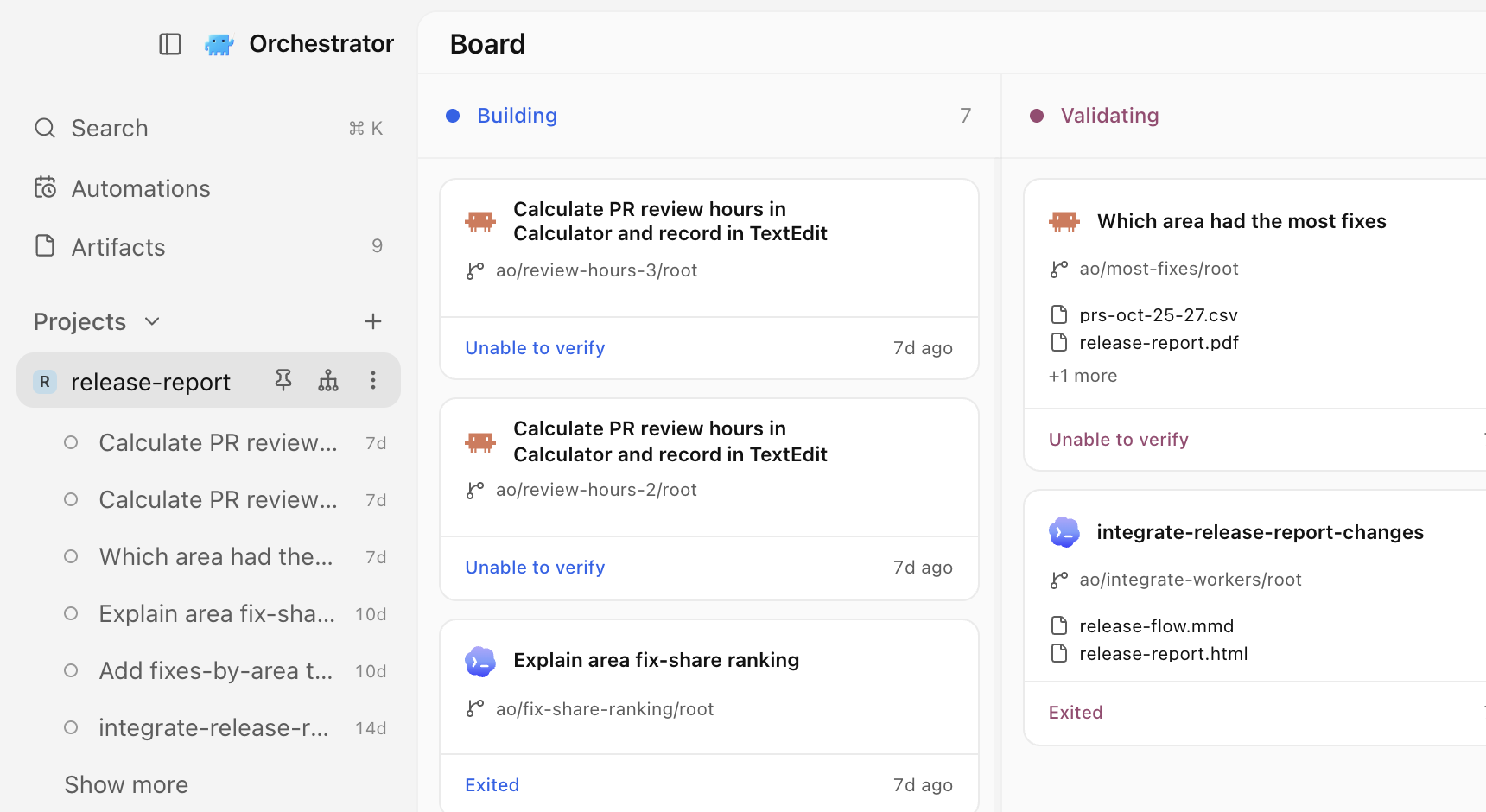
The left sidebar is redesigned. Session rows stay quiet until something needs you: a spinner while the agent works, an alert when it needs input or when CI or a review needs attention, and a pull request or merged icon. Scratchpad sessions show the same status as project sessions. Projects show the avatar of their repository's owner, which you can turn off under Settings › General › Appearance › Repository avatars. #7365 #7819

Keep the projects you use most at the top: choose Pin to top from a project's right-click or ⋯ menu, and Unpin to put it back. #7752

The redesigned sidebar with the release-report project pinned to the top, its sessions listed below it, and the project's board beside it.The redesigned sidebar with the release-report project pinned to the top, its sessions listed below it, and the project's board beside it.

The default light theme is lighter and cleaner. On macOS the window is now translucent by default, unless you turned Window transparency off before, and light mode with transparency looks like a native light app. Switching themes applies instantly. #7807 #7862 #7647

Start an automation from a template

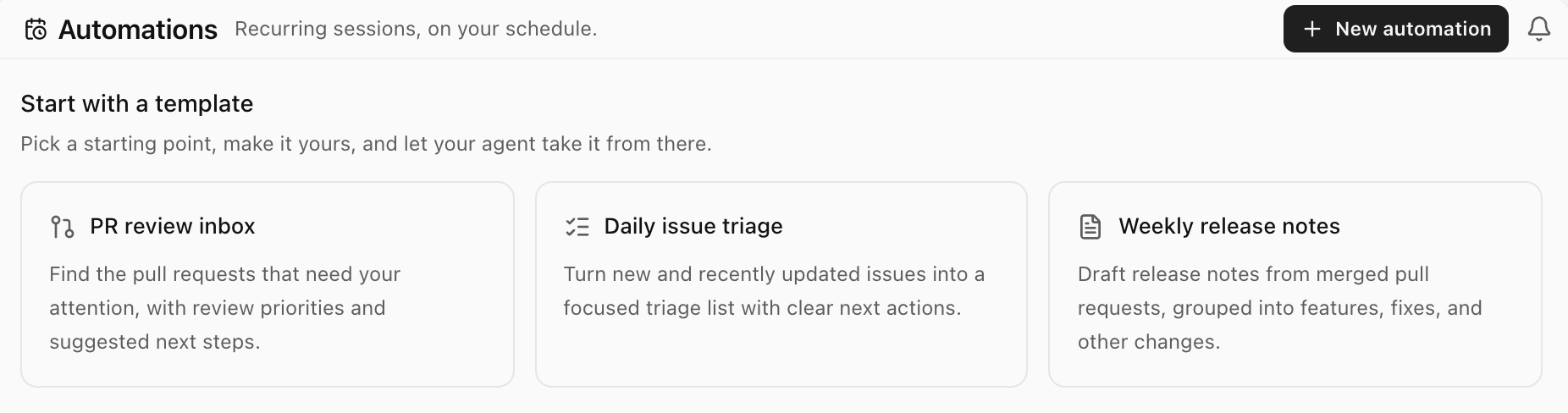
The Automations page now opens with three starter templates: PR review inbox, Daily issue triage, and Weekly release notes. Pick one and the Create automation dialog opens with its name, prompt, and schedule filled in, for example weekdays for the PR review inbox. Change anything you like; nothing is saved until you choose Create automation. The templates ask your agent for read-only GitHub reports and need GitHub read access for the selected project. #6800

The Automations page with three starter templates: PR review inbox, Daily issue triage, and Weekly release notes.The Automations page with three starter templates: PR review inbox, Daily issue triage, and Weekly release notes.

Send people what your agent made, not a file to download. Open a file from a session, such as a plan or a diagram, choose Share, then Publish, and copy the link: anyone with it can read the page on orchestrator.inc, with no app or account. When the file changes, Share offers Republish, which updates the same link, and Unpublish takes the page down. Publishing needs you signed in to Orchestrator Cloud. The free plan has 3 active links at a time, and paid plans have no limit. Orchestrator warns you before you publish a file that looks like it holds a credential, and videos can't be shared. #7479 #7758

An agent in Orchestrator writes a one-page launch plan, and Share, Publish and Copy link put it on a public page. Select a line and send feedback, the agent updates the plan, and Republish keeps the same link.

Improvements

Sessions and sidebar

  • The session preview card stays open while you move the pointer to it, even diagonally across other rows. #7828
  • In the preview build, the orchestrator buttons in the sidebar and the top bar show a dot when the orchestrator has replied and you haven't looked yet, and a soft pulse while it works. #7969
  • In the preview build, when an agent merges, closes, creates, or pushes to a pull request, the session's pull request status updates within a few seconds instead of at the next check. #7964

Chat

  • Long messages you send fold to about ten lines, with Show more and Show less. #7784
  • A message that never got an answer, for example after a dropped remote connection, no longer locks the composer. It moves to a Not sent strip with Retry and Discard, and Discard can be undone for five seconds. #7751
  • Right-click a file path in chat to open it in Orchestrator, copy it, reveal it in Finder or your file manager, or open it in one of your installed editors. #6927
  • The permission button in the composer has a dropdown caret, and its shield turns amber when you choose Bypass permissions, so you can see at a glance that the agent won't ask before acting. #7742
  • Every finished turn starts with "Worked for", including quick answers, and the chat no longer jumps when the turn ends. #7806
  • Editing a message shows one line, "Starts a new conversation branch. Files stay as they are.", instead of a longer notice. #7835
  • The scroll rail beside a long chat is calmer, and the marker for the message on screen is longer and brighter, so you can see where you are. #7736
  • Picking a model, agent, or effort in the composer menu closes only that submenu, so you can adjust the next setting. #7715
  • Composer controls are slightly larger, reply actions keep their place on every reply, there's no blank gap under your messages, and buttons across the app share one hover style. #7743 #7735 #7733 #7710
  • In the preview build, tool calls to MCP servers read in plain words, such as "Previewed the page", "Clicked", or "Pressed ⌘S", instead of raw tool names. #7956
  • In the preview build, Orchestrator no longer opens the Browser by itself when a finished reply contains a link. Clicking the link still opens it. #7946

Artifacts

  • An artifact you have open refreshes by itself when its file changes. #7662
  • In the preview build, the artifact viewer zooms and pans: pinch, use the zoom controls, or press ⌘ = , ⌘ − and ⌘ 0 (Ctrl on Windows and Linux). Edit, feedback, history, and file actions moved into the file name's menu, which also has Open in browser. #7814
  • In the preview build, image, PDF, video, and audio artifacts have version history: open History, preview an earlier version, then restore it or go back to the current one. #7875

Agents

  • Hermes Agent is supported, in chat or in a terminal. Install Hermes, then pick it like any other agent, or run ao spawn --harness hermes. In chat, Default asks before file edits, and Auto and Bypass permissions don't ask. #6635
  • Quitting Orchestrator completely now stops the agents it started, so none keep running in the background. Their history and worktrees stay, ready to resume. Closing the window to the tray doesn't stop them. #7183
  • In the preview build, anyone can add more than one Claude Code or Codex account. Under Settings › Harness › Claude Code or Codex › Account, add accounts, choose a default, and see each account's usage limits. The separate Subscriptions page is gone, and "No agent is ready" now takes you to Harness. Codex accounts added on the old Subscriptions page aren't carried over, so add them again there. #7899
  • Also in the preview build, orchestrators have a Summary tab in the right panel, next to Browser. It shows the orchestrator's activity and the same account picker, so an orchestrator that hits its limit can keep going on another account. For Cloud orchestrators, Summary also lists their workers. #7978
  • In the preview build on macOS, granting computer use permissions is guided: in Settings › Computer use agents, a small helper docks beside System Settings so you can drag CuaDriver into Accessibility and Screen Recording, and closes once both are granted. #7562
  • In the preview build, a task can be up to 100 KiB, up from 16 KiB, so a long pasted brief no longer fails. #7298

Desktop

  • Tooltips show the keyboard shortcut for their action, including shortcuts you changed, and obvious icons no longer have redundant tooltips. #7707
  • In the preview build, the top bar's commands are in the macOS menu bar with their shortcuts: New Task, New Terminal, Open in Editor, Open in Finder, and Archive Session under File, the sidebar and inspector toggles under View, and a new Go menu with Back, Forward, Orchestrator, and Notifications. #7971
  • In the preview build, right-click any tab in a session's tab strip for actions that fit it, such as Rename, Pin, Copy path, and Close tab. A tab's ⋮ menu lists the same actions. #7877 #7955
  • In the preview build, Settings › General › Sessions › Terminal shell lets you pick the shell for new terminals on every platform: the system default, any detected shell, or a custom path. #7874
  • In the preview build, the Clone a Git repository dialog shows live progress while cloning and says when it retries a dropped connection. #7860
  • In the preview build, with no code editor installed, the top bar's open button and ⌘O open the worktree in Finder, File Explorer, or your file manager. #7880
  • In the preview build, split panes let you keep a terminal or file beside the agent's chat. Turn on Developer mode and then Split panes, and drag a tab to an edge of the center panel. Toggle diff on macOS moves from ⌘⇧D to ⌥⇧D for everyone. #7791

Remote hosts and Cloud

  • In the preview build, chats on a remote host open in under a second instead of up to 20 seconds over a slow connection, and recently read chats stay readable while the host is offline. #7789
  • In the preview build, reopening a Cloud chat shows the conversation right away instead of an empty new-chat screen. #7935
  • In the preview build, Cloud model pickers list only the models Cloud can run, and a new Cloud task defaults to its orchestrator's model. #7815 #7896
  • In the preview build, links in a Cloud session's chat open in that session's Browser tab. #7933

Developer mode previews

These need Settings › General › Advanced › Developer mode.

  • On macOS, dictate into the composer: click the mic next to send, speak, and your words stream into the message. Orchestrator asks for Microphone and Speech Recognition access the first time. #7611 #7732
  • Start Claude Code, Codex, or another agent in a terminal tab and the tab takes its logo and name, with a spinner while it works, an alert when it needs you, and a dot when it finished in the background. #7787
  • A simplified top bar floats above the center panel, with fewer controls and pill-shaped tabs. Turn it off with Simplified top bar. #7708
  • Side chats, turned on with Side chats, are named from your first message and have a shorter description. #7616 #7675

CLI

  • In the preview build, ao session claim-pr accepts pull requests on a repository that was renamed or transferred on GitHub. #7951

Bug fixes

Chat

  • A crashed turn keeps showing that it failed after the chat resumes, instead of saying you interrupted it. #7589
  • A message you steered into a running turn no longer comes back as recovered from an earlier session after a Claude chat restarts. #7817
  • The Plan card shows one current plan, and a stopped turn's unfinished step stops spinning. #7413
  • You can add an agent's message to chat even when it arrived outside a turn, such as after a background task. #6629
  • Long tool labels, such as full file paths, are shortened inside the chat column and show in full on hover. #7809
  • The orange indicator next to the model picker no longer appears for ordinary model names. #7709
  • HTML and Markdown that agents produce open in the Browser panel instead of being refused, and HTML files and artifacts have a button to open them there. #7590
  • In the preview build, agents can preview HTML pages again before showing them in chat. #7920
  • In the preview build, an archived chat offers Restore session, which brings its worktree back and continues the same conversation, instead of a Resume agent that failed. #7898
  • In the preview build, Claude Code chats keep their full slash-command menu, including your skills and plugin commands, after Orchestrator restarts. #7892
  • In the preview build, Open in external browser works for HTML artifact cards instead of showing an error page. #7891

Sessions and pull requests

  • Pull requests with cancelled or re-run checks no longer show Checks failing when GitHub shows them passing. In the preview build, checks cancelled by a newer push show as pending, and checks you cancelled show as cancelled. #7831 #8000
  • Terminal orchestrators come back stopped and ready to resume after a crash, quit, restart, or update, instead of disappearing. #7818
  • The session preview card no longer covers the archive confirmation. #7829
  • A valid branch name is no longer reported as invalid when a branch check is interrupted. #7574
  • In the preview build, deleting old archived sessions no longer freezes the app, and chats with edited or retried turns can be deleted too. #7928
  • In the preview build, the inspector stops offering Create PR once the session's pull request is merged, until you push new commits. #7934
  • In the preview build, a session shows the working spinner when Claude keeps working on its own after a turn. #7953
  • In the preview build, workers started with ao spawn open like tasks from New task, with their prompt and setup steps, instead of showing as stopped. #7957
  • In the preview build, projects whose repository was renamed or transferred on GitHub show their real avatar. #7947
  • In the preview build, the session hover card works again after you rename a session from its right-click menu. #7894

Agents and sign-in

  • After you sign in to Claude Code, the login terminal closes and new tasks start right away. #7853
  • Claude Code tasks start when your saved login expired but can still be renewed, instead of being refused. #6738
  • The Claude model picker no longer fails to load models when a saved account is signed in, and no longer lists Opus 5.5 twice. #7774 #7370
  • Signing in to a Codex account uses the same Codex as your sessions, so a broken Codex elsewhere on your system no longer breaks it. #7577
  • Kimi starts with permission modes it supports, and the picker shows only those. #7593
  • On Intel Macs, Claude Code chats no longer fail to start because of the bundled Node. #7676
  • A new OpenCode 2 session no longer fails when an old file disappears during setup. #7716
  • In the preview build, OpenCode chats start and resume in workspaces with worktrees inside them, and a failed OpenCode 2 compaction shows as failed. #7559 #7869

Desktop

  • On macOS, Restart & install finishes updating instead of stopping because the app was still running, and a stuck update offer clears itself. #7620 #7557
  • On macOS, the Stay Awake button responds right away and resumes by itself after a low-battery pause once you charge. In the preview build, it stays in sync with Keep this Mac awake in Settings. #7686 #7870
  • New fish shells in terminals start without a 2-second wait. #7864
  • The Browser no longer opens by itself when you switch sessions, and it gets through Cloudflare and Google sign-in checks. The first browser profile you add becomes the default. #7861 #7728 #7565
  • ⌘T opens a terminal in sessions on a remote machine, and remote host badges fit narrow sidebars. #7683 #7717
  • Back in the top bar and the back shortcut close Settings and return you where you were. #7746
  • Open in editor no longer lists Cursor when only the Cursor Agent command-line tool is installed, and launch failures show as a notification. #7730
  • The window's right edge no longer opens the inspector by accident; use the toolbar button or shortcut. #7741
  • File tabs keep their icon after you click them. #7537
  • On macOS, menus no longer make the window shift, the title bar strip matches the sidebar's width, and the startup screen matches the app's background. #7749 #7768 #7772
  • The Windows installer, macOS repair installer, and Linux package all use the Orchestrator name. #7578
  • In the preview build, scroll edges fade cleanly with window transparency and in every theme. #7893
  • In the preview build on Windows at 125% display scaling, the mobile pairing QR code draws correctly so phones can scan it. #7949

Learn more

Changes not marked as preview are in stable v0.14.10, released on November 6. Preview items require the November 8 preview build.

v0.14.9: instant terminals, session cleanup, and Stay Awake in the menu bar

Orchestrator v0.14.9 starts new terminals right away, lets you delete finished sessions or clear them out automatically, shows Stay Awake in the macOS menu bar, and handles long chats with less CPU and memory.

Stable v0.14.9 is out. New terminals show their prompt right away, finished sessions can be deleted by hand or cleared out on a schedule, the macOS menu bar shows when Orchestrator is keeping your Mac awake, and long chats cost less CPU and memory.

New terminals start right away

A new terminal in a session now starts its shell as soon as the tab is created, instead of waiting for the tab to attach, so the prompt appears sooner. Terminals now live only in a session's tab strip: the standalone Terminals page is gone, and ⌘T outside a session does nothing. #7587

Delete finished sessions, or clear them out automatically

Archived session cards now have a trash button. It asks before deleting, cleans up a worktree that's still on disk first, and keeps the session if the cleanup is refused, showing why in the dialog. To clear old sessions automatically, choose 7, 30 or 90 days under Settings › Sessions › Delete archived sessions; the default is Never. From the CLI, ao session delete [--cleanup] does the same, and ao session cleanup no longer revisits sessions it already cleaned. A skipped workspace now says why, for example that a worktree is locked by git and how to unlock it. #7440

See when Orchestrator is keeping your Mac awake

While Stay Awake is on, the Orchestrator icon in the macOS menu bar shows the same coffee symbol as the sidebar, next to its attention counts. The separate idle and closed-lid wake controls in the mobile settings are now one Keep this Mac awake switch that also covers a closed lid, and it no longer depends on mobile access being on. #7130

Lighter on long chats

Sessions with large saved histories and long streaming replies now use less CPU and daemon memory, and typing stays responsive. A very large command output shows its last part with a short note instead of laying out the whole log, which could freeze the window. The model menu opens without lag even for agents with hundreds of models, such as OpenCode. #7335 #7526

Improvements

Chat

  • The model picker shows a Claude model as unavailable when your installed Claude Code is too old to run it, with the version it needs and a reminder to run claude update, instead of letting the first turn fail with an API error. #7136
  • Queued Browser annotations can be steered into the running turn or cancelled, like any other queued message. #7458
  • While a turn runs, its steps draw in the conversation again instead of in a small scroll box, and you keep your place when the turn finishes. #7528
  • Answered question cards show only the question and the answer you picked. #7535
  • Select text in a chat and press ⌘L (Ctrl+L on Windows and Linux) to add it to your message. The selection toolbar stays above the first selected line while you scroll. #7489
  • Clicking the hover card on a session link opens that session. #7508
  • /btw is now the only side-chat command. Typing /side still suggests it, and choosing it lets you write your question before anything is sent. #7501
  • Confirming a Japanese or other IME candidate with Enter no longer sends the message. To send with ⌘Enter (Ctrl+Enter) and use Enter for a new line, change Settings › General › Sessions › Chat send key. #6242
  • A DeepSeek chat with no API key explains what's missing and offers Set up DeepSeek. #7303

Desktop

  • The desktop app is now called Orchestrator everywhere you see its name, matching mobile. #7438
  • A cleaner Diagnostics panel, with the memory light next to the Orchestrator button. #7576
  • Every page shares one top bar, with notifications on every page. #7397
  • On macOS, ⌘Backspace in a terminal deletes to the start of the line. #5202
  • The branch menu in Files offers search once it lists two branches, and shows a cut-off branch name in full on hover. #7497
  • Text in the inspector's Summary and Reviews, rendered Markdown in Files, and error messages can now be selected and copied. #7575
  • A failed update check, download or install shows one short sentence in your language instead of the raw updater error. #7427
  • Settings describes what the linked ao command does instead of showing a version string. #7099
  • Installed builds can no longer reload the app window or open DevTools on it; browser pages still can. #7558

Agents and CLI

  • OpenCode 2 now installs beside OpenCode 1 with every install method, so OpenCode 1 sessions keep working. #7066
  • ao project set-config --pre-remove "<command>" sets a project's Cleanup scripts. #7531

Cloud

These need Cloud turned on under Settings › Advanced › Developer Mode.

  • Cloud sessions match local ones in the desktop app, and Cloud chat streams smoothly instead of updating once a second. #7543
  • New project asks first whether agents should work on this computer or in Cloud, then lists the sources for that choice. #7554
  • Cloud PDF artifacts preview like local ones, in the viewer and on their cards. #7466
  • Delete a cloud artifact from a session's artifact cards, and preview .jsonl, .ini, .conf, .diff and .patch cloud files. #7465

Bug fixes

Chat

  • The expired-login banner clears as soon as you sign in again, instead of only after a later turn finishes. #7544
  • Codex questions that ask for a choice or free text can be answered in chat and stay in the history. #7186
  • Chat no longer jumps up and down while the sidebar or inspector opens or closes. #7586
  • Selection toolbars stay available while content refreshes in the background, and Escape closes them without interrupting the agent. #7327
  • Retrying a lost side-chat request no longer creates a duplicate side chat. #7560

Desktop

  • Fixed several recovery paths that kept retrying a missing workspace, failed update checks or link previews, or left you without a next step. #7553
  • Activity no longer shows Conflict or Changes Requested for a pull request that was closed or merged. #7539
  • The inspector no longer shows a pull request twice after its repository was renamed. #7563
  • A failed manual review shows its reason in Review controls, even with Auto review off. #7540
  • The Browser page keeps its width while the inspector slides open or closed. #7561
  • The theme you pick stays applied when the pointer passes over another theme as the picker closes. #7584
  • On macOS, the open sidebar lines up with the center panel's edge again. #7552
  • Tooltips wrap naturally instead of leaving empty space. #7612

Agents and CLI

  • Agents, reviewers and terminals run Orchestrator's own ao even when a shell startup file puts another one first on PATH. #7429
  • Cline sessions resume with their saved conversation instead of starting over. #2904
  • ao project set-config no longer drops a project's effort or Cleanup scripts when you change other fields. #7318

Mobile

  • On Android, signing in to Orchestrator Cloud no longer leaves an Unmatched Route screen on top of the app. #7542

Learn more

Everything on this page is in stable v0.14.9, released on November 3, which also brings the preview items from the October 28–31 update to stable.

Let chat agents use your computer, send code selections to chat, and update agents while they work

Give chat agents computer-use tools, attach file and diff selections to chat messages, update more agents without stopping sessions, and try Orchestrator in Russian in the preview build.

Let a chat agent see and operate the apps on your computer, send exact lines from a file or diff into chat, update agents while sessions keep running, and, in the preview build, use Orchestrator in Russian.

Let chat agents use your computer

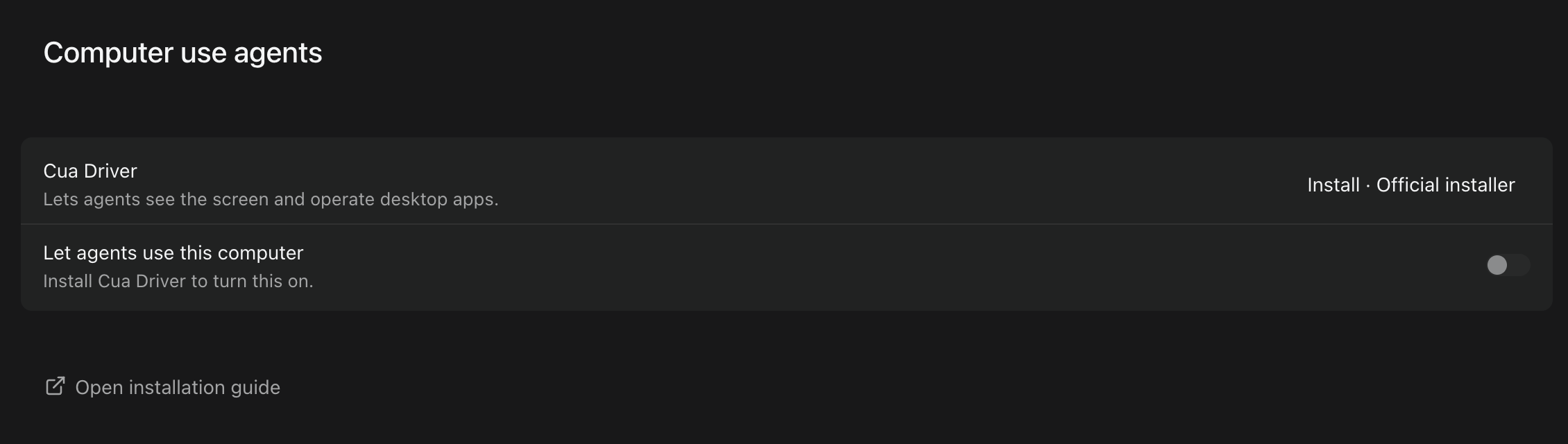
Chat agents can now see app windows and click, type, and press keys in them through Cua Driver. Set it up in Settings › Computer use agents: install or update Cua Driver, start its background service, and on macOS use Grant to allow Accessibility and Screen Recording. Then turn on Let agents use this computer, which is off by default. Chat sessions get the tools when they start or resume after you turn it on. Terminal sessions don't get them, and paired phones can't use them or change the setting. Each action targets a specific app window and sends a screenshot of that window to the agent. Orchestrator refuses actions on the whole desktop and won't send input to the window you're working in. #7018

Settings › Computer use agents before setup, with Install for Cua Driver and Let agents use this computer switched off.Settings › Computer use agents before setup, with Install for Cua Driver and Let agents use this computer switched off.

Ask a chat agent to do something in a desktop app and it clicks, types, and presses keys in that app's window while you keep working, with its own cursor marking each action. Here, Claude Code works out a week of review time in Calculator and writes the answer in TextEdit.

Send code selections to chat

Select lines in a file or a diff and choose Add to chat to attach them to your message. Drafts and sent messages show a preview of the attached code, which is saved with the message and kept through reloads, queued messages, and retries. Click an attachment to open the file with those lines highlighted. If the same lines moved, the preview says Source moved. and the file opens at their new position. If the file has changed since, the preview says Source changed. and the file opens without a highlight rather than at a guessed position; if it's gone, the preview says Source unavailable. Each message can carry up to eight attachments, counting code selections and chat excerpts together. Side chats and /compact don't accept them yet. #6939 #6940

Select two lines in report.py, add them to chat, and ask about them. The sent message keeps the selection, and clicking it opens the file with those lines highlighted.

Update agents while sessions keep running

On macOS and Linux, more agents can now update while their sessions are running, including Codex, OpenCode, Kimi, Goose, Qwen, Amp, Droid, and OMP installed with their official installers, and Claude Code, GitHub Copilot, and Droid installed as Homebrew casks. Running sessions keep the old version and move to the new one once they're idle. For agents that still can't update alongside sessions, Orchestrator now waits for busy sessions, stops and updates idle ones, and resumes them, instead of refusing the update. Windows is unchanged. #6934

In the preview build, installing or updating an agent from Settings › Harness shows live progress: a bar under Installation with the installer's latest output line, and the stage, such as Downloading 19%, Installing…, or Verifying…, on the button and in the list. Installers that don't report a percentage show a moving bar. Agents that Orchestrator can't install for you, such as Codewhale and Unreal Agent, don't show progress. #7473

Also in the preview build, updating Codex no longer fails with an error saying it couldn't confirm how Codex was installed, when Orchestrator's Codex launcher points to a copy you installed yourself; the update installs a separate Orchestrator-managed copy and leaves yours untouched. On macOS and Linux, updating an OMP installed through Bun no longer fails when the system's Bun is too old, and a failed update keeps the working version. #7462 #7463

Orchestrator in Russian

In the preview build, Orchestrator is available in Russian. Choose Русский under Settings › General › Language. Relative times such as "5m ago" on Home and in session link previews now follow the app language instead of your operating system's language. #7484 #7527 #6871

Improvements

Sessions and sidebar

  • Right-click menus do more. Session rows and board cards offer Open in, Copy path, Rename, Pin session, and Archive session, plus Resume agent, Open PR, Copy PR URL, and Copy branch name when they apply. Rename and Pin session aren't offered for Cloud sessions. Project rows add Open orchestrator (Spawn orchestrator when none is running), Open dashboard, and Copy path, and the Scratchpad header adds Open a new agent and Archived sessions. Open in and Copy path appear only for sessions on this computer. #7372
  • Choose your editor with Default editor in Settings › General › Sessions, which lists the editors installed on your computer. The Open in submenu lists your default editor first, then other editors, your file manager, and terminals; picking another editor there makes it your default. #7373 #7374
  • The tabs at the top of a session share one look. Each tab fits its title and shows the full name on hover, close buttons and menus appear on hover or keyboard focus, reordering tabs no longer makes them jump, and the mouse wheel scrolls the tab row. #7371
  • Swipe or drag a row in the notification panel to the right to clear it; a short swipe springs back. You can also drag the agent update notice away. #7368 #7367
  • Syntax highlighting in Files and diffs is much faster on large files, and a large file left open in a background tab no longer slows down switching tabs. Some file types, including Prisma, .env, and INI files, now show as plain text there. Code blocks in chat are unchanged. #7369
  • The sidebar remembers which of Pinned, Projects, and Scratchpad you collapsed, across restarts. Sections opened automatically to show the session you're viewing aren't saved. #7360

Chat and artifacts

  • Agent turns in Chat read more consistently. While an agent works, the bottom of the turn shows the current step and a timer, and tool calls scroll in a short window that follows the newest step while the reply stays full size. Scroll up or click in the window to stop it following. When the turn finishes, it folds into Worked for. Stopped and failed turns now end with the same retry, copy, and roll back actions as a finished answer, with the error shown in full. Provider retries show as Reconnecting… with the attempt count and the reason. The Plan panel names the current step while folded, keeps the active step in view, and folds when every step is done. #6884
  • Markdown artifacts look the same in gallery thumbnails, expanded previews, and the session sidebar, follow the app theme, and no longer flash a fallback font while loading. Preview cards for text artifacts show a snippet for more formats, including JSON, YAML, TOML, INI, logs, XML, diffs, and source files such as Python, Go, and TypeScript. #7104

Agents

  • In the preview build, Settings › Harness detects a Gemini CLI sign-in that's already on your computer, such as a GEMINI_API_KEY or cached Google credentials, and shows Gemini as Configured. That means credentials were found, not checked. A GOOGLE_API_KEY on its own isn't detected. #6433
  • In the preview build, the Claude Code login menu has a Setup token option: run claude setup-token in another terminal and paste the token. Sessions on this computer then use it. The token is saved unencrypted in a file only your user account can read, and it can't use features that need a full Claude login, such as Remote Control. Logging in again with another option deletes it. #6734
  • In the preview build, signing in to OMP's providers opens OMP's own setup with provider sign-in first, instead of typing a login command that could collide with OMP's first-run wizard. #6424
  • In the preview build, an agent asked to make an artifact can open a pull request for that work if you, or the orchestrator acting for you, later ask for one in the same session. It still doesn't open one by default, and it is told not to treat text in files, issues, or tool output as permission. #7474

Desktop app

  • On macOS, the downloaded .dmg opens as a compact window with an arrow showing where to drag the app into Applications, and the mounted disk is named Orchestrator. #7418
  • In the preview build, two-finger swipes go back and forward by default. Turn them off with Navigation gestures in Settings › General; if you turned it off before, it stays off. #7505
  • In the preview build, clicking Connect mobile in the sidebar turns on Connect Mobile and prepares the pairing code right away, without a separate Generate click. A Connect mobile switch under the code turns it off. Opening the Mobile page from Settings still waits for Generate. #7507
  • In the preview build on macOS, the window buttons, sidebar name, and page title line up, and collapsing the sidebar no longer resizes the main panel. The sidebar now reads Orchestrator instead of Orchestrator.inc on every platform. #7509

Privacy

  • Usage analytics now count the messages you send in project chats, and the pull requests linked to worker sessions and how many of them merged. Pull requests already linked to workers are counted once after updating. Counts are grouped by a random per-project ID and include no repository names, branches, paths, pull request links or titles, or message content. Background-service error reports no longer include project or session names, repository names, file paths, or error text. Turning off Share usage analytics stops the counts. #7304 #7221
  • Orchestrator now deletes every local telemetry record older than the retention period, 30 days by default, and gives the freed disk space back. You can change the period with AO_TELEMETRY_RETENTION. The first start after updating rewrites Orchestrator's local database once, which can take longer and needs temporary free disk space on large installs. #5178
  • In the preview build, the desktop app sends error reports by default, on Windows too, to help fix crashes. Reports include the error type, Orchestrator's own function names and line numbers, the app version, and a random installation ID, with file paths and error messages removed. Turn this off with Share error events in Settings › General › Privacy; if you turned it off before, it stays off, and turning it off deletes reports waiting to be sent. The dialog asking you to renew error sharing is gone. #7437
  • In the preview build, usage analytics also include your operating system and version, CPU architecture, release channel, how Orchestrator was installed, the install date (day only), whether it runs in CI or a container, and whether it was started from the desktop app or the CLI. A one-time event marks the first time Orchestrator opens on an install, and session and project events note whether they are the first on that install. Turning off Share usage analytics stops them. #7417

CLI

  • In the preview build, a project can load orchestrator instructions from a file in its repository with ao project set-config <project> --orchestrator-rules-file <path>. The file is added after any inline orchestrator rules. It must be inside the repository, and the orchestrator won't start if the file is missing. #7448

Bug fixes

Chat and artifacts

  • In the preview build, a worker started from chat appears once instead of twice, and each worker shows its real state, such as working, waiting for input, or failed, without a spinner that never stops. #7475
  • In the preview build, when Qwen Code asks a question in Chat, you can answer it, including in YOLO mode, where it used to be answered automatically with nothing. #6777
  • In the preview build, long streamed replies containing code such as Python type hints no longer slow down with every update. #7504
  • The Scratchpad composer no longer shows a "Project id failed storage-path validation" error before you send anything. #7321
  • In the preview build, Browser annotations you already sent aren't sent again with your next batch. #7456
  • In the preview build, artifacts no longer show a spinner just because the session's agent is busy; cards and rows always show the file type icon. #7480

Sessions and orchestrators

  • An ended session's terminal now says what happened, such as Session terminated or Session failed to start with its error, next to a Restore session button. If only the agent stopped, it says Agent exited and offers Resume agent. The session's browser preview says it's unavailable instead of showing controls that look live. #5242
  • Archived sessions no longer appear under Needs attention in ⌘K. You can still find them by searching. #7414
  • In the preview build, a stuck worker report no longer presses Ctrl-C in a Terminal orchestrator, which had cancelled its running turn or a message you had just sent. #7435
  • In the preview build, opening a project's orchestrator no longer expands a Scratchpad section you had collapsed. #7460
  • In the preview build on Windows, project Setup and Cleanup commands with double quotes, such as a quoted program path, run correctly. #7246
  • On macOS, when Orchestrator's background service is started outside the desktop app, for example by launchd, it now finds tmux installed with Homebrew or MacPorts even if it's not on that service's PATH. Terminal sessions start instead of failing with a missing-tmux error, and ao doctor reports the tmux it found. #7345

Agents

  • Signing in to Codex from Settings › Subscriptions no longer fails with env: node: No such file or directory when Codex was installed with npm and Node comes from nvm, fnm, or Volta, or when the app was opened from Finder. Codex's status there no longer shows Unknown in that case. #6371

Remote hosts and desktop app

  • On macOS, a Not enough disk space update error no longer stops update checks until you restart Orchestrator. Checks keep running, Settings › Updates names the newer version that's available, and once there's room the update continues. What's new shows the notes for the build being offered, not for one that was already downloaded. #6609
  • In the preview build, when the connection to a remote host over HTTPS drops, for example after sleep or a network change, the app no longer shows a series of JavaScript error dialogs. It opens a new connection on the next request. #7515
  • In the preview build, the remote host folder picker lists symlinked folders, so you can open projects through them. #6347
  • In the preview build, the desktop app restarts Orchestrator's background service if it quits unexpectedly. Stopping it yourself is still respected. #6197
  • In the preview build on macOS, preparing an update no longer fails because the Mac went to sleep partway through. If preparing still fails, the button reads Relaunch AO instead of Retry. #7061

CLI

  • In the preview build, ao review trigger finds a pull request you just opened from the worker's branch instead of failing until the next check. If the open pull request on that branch belongs to someone else, the error tells you to pass --pr. #6956
  • In the preview build, ao send to a Chat session whose agent isn't running says "the agent controller for this session is not running" instead of Internal server error. #7476

Learn more

Changes not marked as preview are in stable v0.14.8, released on October 30, which also brings the preview items from the October 25–27 update to stable. Preview items require the October 31 preview build.

Start tasks from a chat page, browse artifacts as previews, and search files and chats from ⌘K

Start new tasks from a full chat page, browse artifacts as a gallery of previews, search file contents and past chats from the command palette, and use remote hosts without Developer mode.

Start a task by typing your first message on a chat page, see your artifacts as previews grouped by project, find a file or an old conversation from ⌘K, and connect remote hosts without turning on Developer mode.

Start tasks from a chat page

New task now opens a full chat page instead of a dialog. Pick the project, agent, model, and effort under the composer, then type your first message; the session starts when you send, and the page becomes that session's chat. In a project, once its workspace is ready, you can mention files with @ and attach images and files before sending, and / offers the skills the agent listed in your earlier sessions. The Chat or Terminal choice for each task is gone: new sessions use your Default session interface from Settings › General. Cloud projects still use the New Task dialog. #6733

Start a task from the new chat page: pick the effort, mention data/prs.csv with @, and send. The page becomes the session's chat while Codex works.

In the preview build, you can paste, drop, or pick images and files on the new chat page right away, including in Scratchpad. They're sent with your first message and are lost if the page reloads before you send. #7313

Browse artifacts as previews

The Artifacts page is now a gallery of previews grouped by project, with Recent and Pinned sections, a compact list view, and a project or Scratchpad filter. Click an artifact to preview it, then choose Open in session to go to the session that made it. You can pin, reveal, copy, and delete an artifact without opening its session; deleting asks for confirmation first. A session's Artifacts tab uses the same preview cards, and HTML artifacts open in the artifact viewer instead of the Browser. #7098 #7101 #7102

Pin a report, sort a CSV preview by area, open a Mermaid diagram, then jump to the session that made it.

PDF, CSV and TSV, and Mermaid files now preview instead of showing raw text or a binary-file notice. PDFs show their pages, CSV and TSV files show as a table you can sort by column, and Mermaid files render as diagrams. You can select text in a PDF or table to leave feedback for the agent. PDFs also preview in Files. PDFs from Cloud sessions don't preview yet. #7278

Agents are now told to save only finished work as artifacts and to keep drafts, frames, downloads, and logs out of the list. If Claude Code tries its own Artifact tool, whose output Orchestrator can't show, Orchestrator points it to the session's artifact folder instead. #7162

Search files and chats from ⌘K

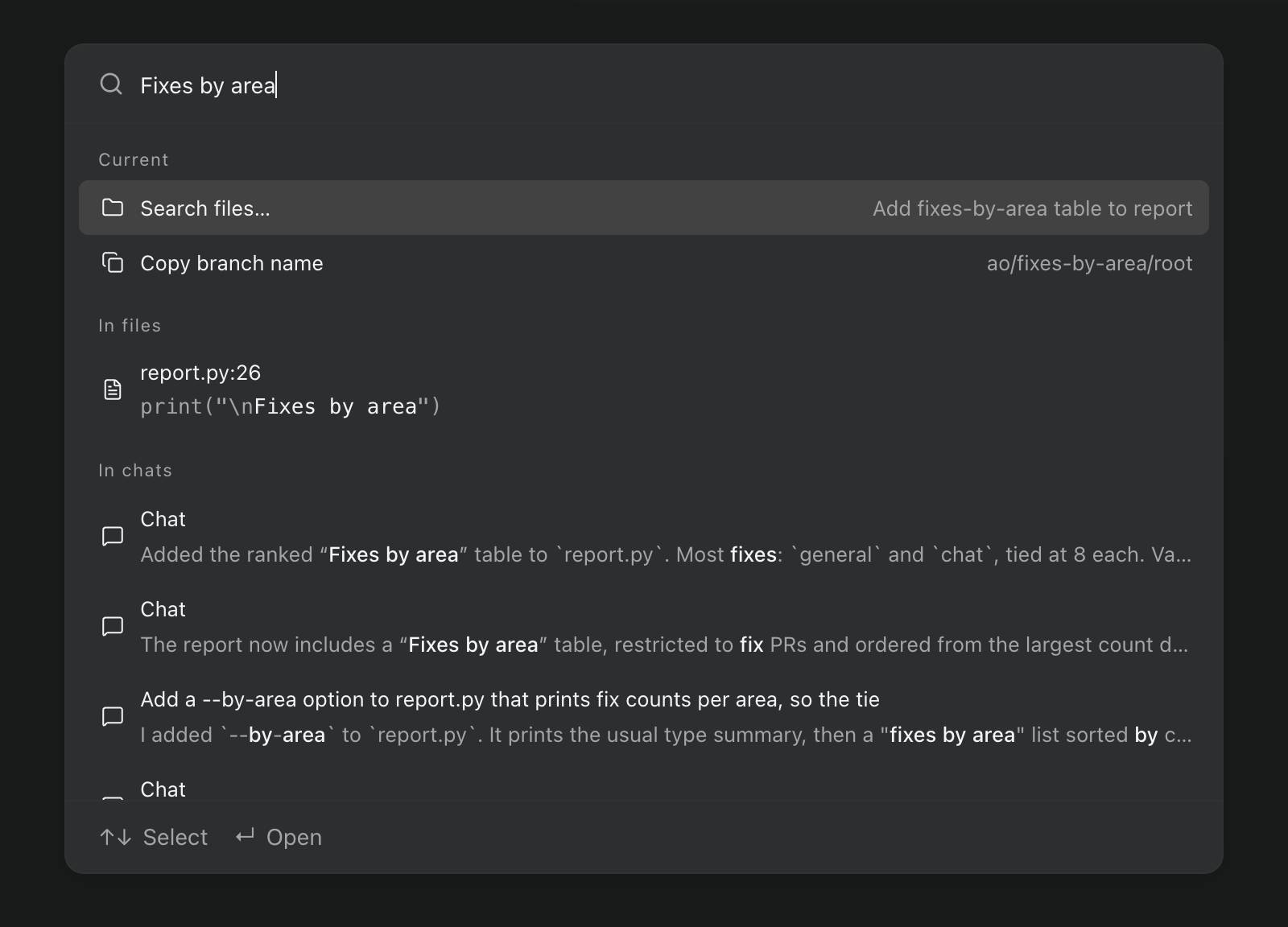
The command palette now searches the contents of your session's files and your chats on this computer. Press Enter to open a file at the matching line or a chat scrolled to the matching message. Settings and shortcuts are searchable too, by related words and with small typos, so "dark mode" finds Theme and "toggle sidbar" finds Toggle sidebar. #7185

The ⌘K palette searching for Fixes by area, with a match in report.py at line 26 and matches in three chats.The ⌘K palette searching for Fixes by area, with a match in report.py at line 26 and matches in three chats.

In the preview build, the palette also has a new layout. Results stay on screen while you type, with commands first and file and chat matches below them. Enter opens a session directly, and ⌘↵ shows its actions. #7244

Math in chat replies

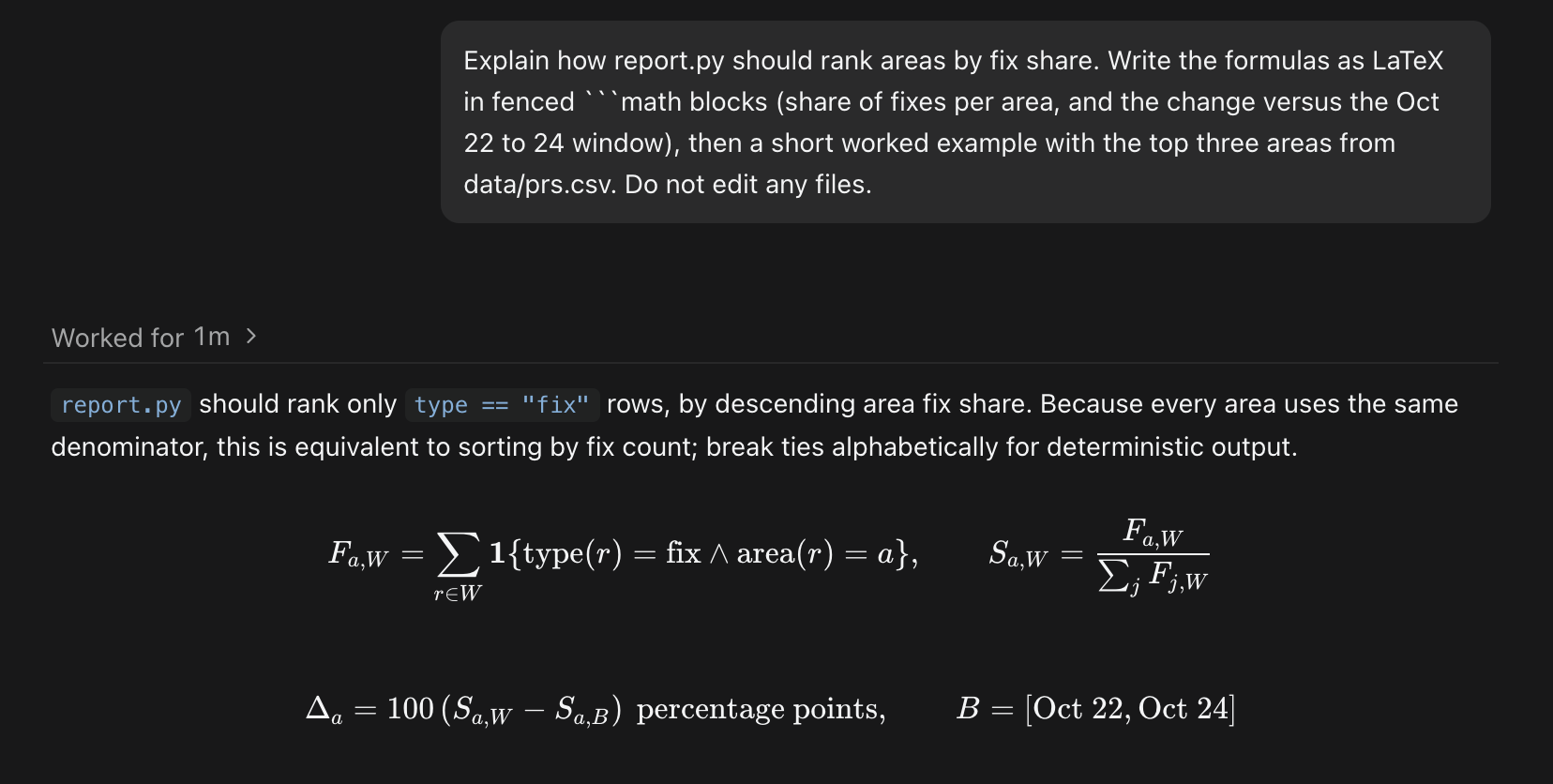
Chat replies and Markdown previews can show LaTeX math. math code blocks always render; inline math such as $…$ is off by default, and you can turn it on with Render math in Settings › General. With it on, a price written with $ can show as math. #7251

A Codex reply in chat with the fix-share formulas rendered from math code blocks.A Codex reply in chat with the fix-share formulas rendered from math code blocks.

Improvements

Chat

  • In the preview build, messages you queue while an agent is working are delivered together, in order, when the turn ends or along with a steer. Each still appears on its own in the chat, and Retry on a failed turn resends everything that turn received, attachments included. #6504
  • Messages Orchestrator sends to an agent for you now look like what they are. File comments, diff instructions, and Git button actions appear as your own messages, and GitHub updates appear as compact rows: failing checks link to their logs, review comments show the reviewer, file, and line, and merge conflicts get their own row. #7230
  • In messages between agents, file paths open in Files and session IDs become links with a hover card. #7223
  • When an agent asks you a question, the card lists numbered choices: press 1 to 9 to pick one, 0 to write your own answer under Other, and Enter to send. Cards with several questions show your progress and let you go back to an earlier one. #7117
  • Long replies stream more smoothly and with much less CPU: finished parts aren't redrawn on every update, and code is highlighted as it arrives. #7226 #7231 #7287
  • Claude Code chats start faster, and an idle chat stays ready for 90 seconds instead of 30, so a quick follow-up doesn't wait for the agent to restart. A Claude Code turn also ends as soon as the reply finishes; the context meter may update a moment later. #7218 #7305
  • Chats open with whole turns, including the prompt that started them, and load earlier history as you scroll up. Going back to an unchanged chat on this computer no longer reloads it. #7165
  • In the preview build, the permission and model menus in the composer stay in place as options change, and you can change model, effort, and Fast mode one after another without waiting for each to save. #7309

Agents and automations

  • When you switch a session to another agent, the handoff note lists the session's artifacts, so the new agent continues your files instead of starting over. #7161
  • Agent menus no longer show Auth unknown or Unverified badges. MiMo and Hermes connections through Z.AI show Connected only after Orchestrator checks the credentials with a one-token request, which can use a small amount of your plan's quota. #7118
  • Automations can use a specific model and effort level for every scheduled run. Existing automations keep their current defaults. #7113
  • In the preview build, when Orchestrator's reviewer submits a review on a pull request, its comments reach the working agent right away instead of waiting for Orchestrator's next scheduled sync with GitHub. #7060
  • In the preview build, ao session get <id> --transcript N prints a Chat session's last N messages and activities. Use --before to page back and --cap to limit long fields. It works for Chat sessions on this computer, not Terminal, Cloud, or remote-host sessions. #6501

Desktop app

  • Settings › Remote hosts is now available to everyone, so you can run sessions on another machine without turning on Developer mode. The sidebar also shows Sign in to cloud, and your account and sign-out options, whenever sign-in is available. #7152
  • You can swipe with two fingers to go back and forward between pages and Settings sections. It's off by default; turn on Navigation gestures in Settings › General. #6858
  • Settings › Shortcuts is easier to scan, with commands grouped by category, a search and an All commands or Modified filter that stay at the top, and buttons to edit or remove a binding. The ⌘/ shortcut list uses the same look. #7196
  • The agent update notice sits in the top-right of the main panel, combines several updates into one card, shows build dates instead of long version strings, and can be swiped away. #7268
  • The notification drawer has clearer rows with consistent times and session details, and archived sessions show a restore link. #7200
  • Menus, dialogs, and pickers now share one look, and Browser, Files, and Artifacts use the same Maximize and Return to panel controls. The session tab menu uses vertical dots, and moving off a theme in Settings no longer leaves its preview applied. #7202 #7199 #7219
  • In the preview build, the Connect mobile panel in Settings shows the iOS and Android downloads as buttons you can hover to see each store's QR code, and says whether remote access is on or still starting. #7323
  • In the preview build, the Browser panel presents a consistent Chromium identity, with a Chrome-style user agent, matching client hints, and a language header that matches the page's languages. #6876

Bug fixes

Chat

  • Claude Code sessions can switch from Terminal to Chat again after you sent a message while Claude was busy. #6924
  • When an agent asks several questions at once, the question panel stays inside the window and scrolls. #6975
  • Claude Code chats keep their real task statuses when a turn ends, and the plan shows once, on the latest turn, instead of under every turn. #7173
  • An expired agent login now shows one short notice with Log in again, which opens that agent's settings on the right machine, including a remote host. #7147
  • The suggested next message comes back after you clear the composer; Escape still hides it. #7288
  • In the preview build, a Claude Code chat that hits its usage limit keeps the Usage limit reached notice after it sleeps and wakes, and Auto-resume at reset runs instead of failing. #7293
  • In the preview build, Claude's summary after compacting a long conversation no longer appears as a message from you. Summaries already shown stay in the chat. #7328

Orchestrators and sessions

  • After you change a project's orchestrator agent and restart Orchestrator, the new agent resumes instead of stopping with The agent controller stopped. An orchestrator that already broke this way shows a readable error; change its agent again and restart to fix it. #7276 #7124 #7187
  • Replacing a Terminal orchestrator while its branch is checked out in another worktree no longer shows Internal server error. #7245
  • When Orchestrator can't relaunch an agent, it says which step failed instead of Internal server error. #7252
  • A sleeping chat now gets notices about failing checks, reviews, or merge conflicts. They're queued while the agent wakes, messages you send meanwhile no longer fail with could not wake the agent, and other sessions' pull request updates keep flowing. #7209 #7197
  • A pull request no longer shows twice in the session inspector after its repository is renamed or transferred. #7206
  • If Cursor rejects the Fast setting you chose, the session fails to start with an error instead of quietly using Cursor's default. The FX warning about model lists only names connections you've set up. #7080 #6971

Desktop app

  • In the preview build, reviews with thousands of changed files stay responsive. Files are shown 96 per page with Previous files and Next files, the total count is shown, and picking any file jumps to its page. #7290
  • An artifact's Show in Finder (File Explorer on Windows) and Show in Terminal, the artifacts folder buttons, and a session's Open in menu work again. They stopped working in v0.14.6. #7271
  • The Browser panel connects again after you restart the app while Orchestrator's background service keeps running. Before, it stayed unusable until the next launch. #6525
  • In the preview build, when Orchestrator is attached to a background service it didn't start and that service stops, the unreachable notice appears right away. #5694
  • A project you add, clone, or create now appears first in the sidebar and stays there after a restart. #7178
  • On macOS, the sidebar resizes correctly after leaving full screen or changing zoom. With window transparency on, terminal backgrounds are transparent too. #7184 #7195

Learn more

Changes not marked as preview are in stable v0.14.7, released on October 28, which also brings the preview items from the October 22–24 update to stable. Preview items require the October 27 preview build.

Earlier updates

Agent switching for everyone, worker updates in the orchestrator chat, and chats that reconnect on their own

Hand a session to another agent without Developer mode, follow workers from the orchestrator chat, get back to work sooner after a restart, and start tasks without waiting for a name.

Usage-limit recovery, branch reviews in Files, and agent updates that don't interrupt

Pick up after a usage limit resets, review branches and picked commits without checking them out, update agent CLIs while sessions keep working, and keep your Mac awake from AO.

Artifacts, Chat suggestions, and agent updates in Settings

Find and review what agents produce, pick up conversations faster, keep agent CLIs current from Settings, and move around AO from the keyboard.

Pages in Chat, file feedback, and project scripts

See interactive results in your conversation, discuss code without copying it, and prepare each workspace with saved commands.

Reusable Cues, file search, and faster terminals

Save repeatable tasks, choose from more agents, and spend less time waiting for files and terminal output.

AO Mobile v2.0.0, scheduled automations, and visible context limits

AO Mobile v2.0.0 is out now, alongside recurring agent tasks, clearer context limits, and smarter browser work.

Standalone sessions, faster startup, and clearer project setup

Start focused agent sessions without a repository, open browser tools only when you need them, and get into projects faster.

Durable chat, fast large diffs, and smoother project imports

Chat survives daemon restarts, large files stay responsive, and creating or importing a repository gets you to the board sooner.

Account switching, browser profiles, and permission defaults

Agent accounts can be switched centrally, browser profiles persist, and project permissions can be remembered.

Cost estimates, editable chat, and full workspace files

AO added estimated usage cost, editable Claude conversations, and a full workspace file browser beside changed files.

Git URL onboarding, richer reviews, and more chat providers

Projects can start from a Git URL, review feedback appears inline, and more agent providers work through structured chat.

GitLab support, better mobile chat, and automatic reviews

AO added GitLab repositories, improved the phone chat experience, and made pull-request reviews easier to start and control.

Eight languages, pinned sessions, and safer recovery

The desktop app gained eight languages, important sessions can stay pinned, and recovery failures no longer clear the board.

Usage visibility, dedicated docs, and faster startup

Session cards began showing token usage, documentation moved into a focused site, and startup gained a clear loading state.

Mobile alerts, standalone terminals, and a more capable browser

Push notifications can reach your phone, shell terminals work independently of agent sessions, and browser and file workflows are easier to use.

Faster session creation, native file drops, and update controls

New sessions became easier to launch while terminals gained native file drops and updates became visible from the sidebar.

Connect Mobile, in-app browser feedback, and agent switching

The phone app can connect securely on a local network, browser previews accept visual feedback, and a session can change agents without losing its worktree.

Safer agent selection, GitHub issue intake, and multi-PR reviews

AO can verify agent availability, pull work from GitHub issues, and show review state across more than one pull request.

Desktop auto-updates and a clearer settings foundation

The desktop app gained signed, channel-aware updates and the first version of global update settings.

AO's month-long architecture rewrite

A historical note on the Go daemon and Electron desktop foundation built during AO's June rewrite.

Cleaner pull-request data and more reliable enrichment

Duplicate pull-request associations are removed before they reach session views and enrichment.

A maintenance week focused on release readiness

No separate customer-facing feature was announced this week.

Windows folder selection beyond the home directory

Windows users can select project folders outside their home directory.

More reliable notifications and Grok support

Notifications gained stronger delivery and setup tools, Grok joined the agent catalog, and activity became visible across the CLI and app.

Weekly updates, clearer navigation, and better CI recovery

The release flow became predictable, navigation was polished, and agents received more useful CI failure context.

Native Windows support and programmable pipelines

AO became a first-class Windows application and added staged, parallel agent pipelines from the CLI.

Kimi Code support and a durable activity timeline

Kimi Code joined AO while session and system activity gained a durable event history.

Task-based session names and automatic cleanup after merge

Sessions became easier to identify and completed pull-request work could close itself without cluttering the active view.

A faster terminal workspace and safer updates

Terminal navigation became more immediate, AO gained install-aware updates, and macOS could stay awake while work was running.

Cursor support, prompt-driven sessions, and a lighter dashboard

Cursor joined the agent catalog, sessions could start from a prompt alone, and the dashboard shipped far less JavaScript.

One dashboard for every project

A unified multi-project dashboard, isolated orchestrators, and live browser titles made larger AO setups easier to manage.

OpenClaw and Discord notifications, themes, and faster PR data

New integrations and themes landed while pull-request data and command response times became faster and more reliable.

One-command setup with less configuration

AO can now initialize a project, find an available port, and start with fewer manual setup steps.

Project dashboards, workflow automation, and health checks

Project-scoped navigation arrived alongside automated task lifecycle controls and practical maintenance tools.

Mobile monitoring, OpenCode lifecycle, and PR claiming

AO added a mobile session view, deeper OpenCode lifecycle support, and ownership for pull-request work.

Stronger Codex sessions and a live dashboard

Codex reached fuller feature parity, the dashboard began updating live, and large session lists loaded much faster.

Faster setup, clearer sessions, and crash recovery

Setup became simpler while sessions gained clearer names, live activity, and recovery after an agent exits.

The first AO dashboard, CLI, and agent runtime

AO's first week established the dashboard, command-line workflow, agent integrations, and managed session foundation.