Conductor Cloud goes read-only on November 13 and deletes data on November 20. This guide shows what to save and how to move your chats, scripts and settings to Orchestrator, with the screens you will see.
Conductor Cloud goes read-only. Old chats can still be read and exported.
Friday, November 20
Conductor Cloud shuts down and Conductor starts deleting Cloud data.
Early 2027
The local Conductor app keeps working until then, and starts winding down.
From Conductor's announcement of November 4, 2026 that it is joining Meta. Cloud shuts down on November 20, 2026.
01
What should I save before November 13? Before November 13
“Conductor Cloud is shutting down. What do I do?
Save it in Conductor before Friday, November 13. Orchestrator can't read Conductor Cloud, so anything left there is deleted from November 20.
1
Push every branch, including unfinished work
In each workspace's terminal:
$git add -A && { git diff --cached --quiet || git commit -m "WIP: move from Conductor"; } && git push -u origin HEAD
Git doesn't push ignored files such as .env. Copy those separately.
2
Transfer the workspaces you want to keep working on
In ConductorRight-click a Cloud workspaceTransfer to local
The workspace and its chats move to your Mac, where Orchestrator can import them.
3
Export your account
In ConductorSettingsAccountExport data
Keep the archive.
4
Write down your Cloud settings
Your Cloud Computer install script, Cloud environment variables, run actions and routines. Conductor hides secrets after you save them, so get each one from wherever you keep it.
“I mostly use Conductor on my Mac. Do I need to rush?
No. The local Conductor app keeps working until early 2027, and its files stay on your Mac. Move when you're ready.
02
Can I keep my Conductor chats? New in nightly
New in nightlyChat import is new in the nightly build and not in the stable release yet. Get the nightly from the download page; it updates itself every night. Download the nightly build
“How do I bring my repositories and chats over?
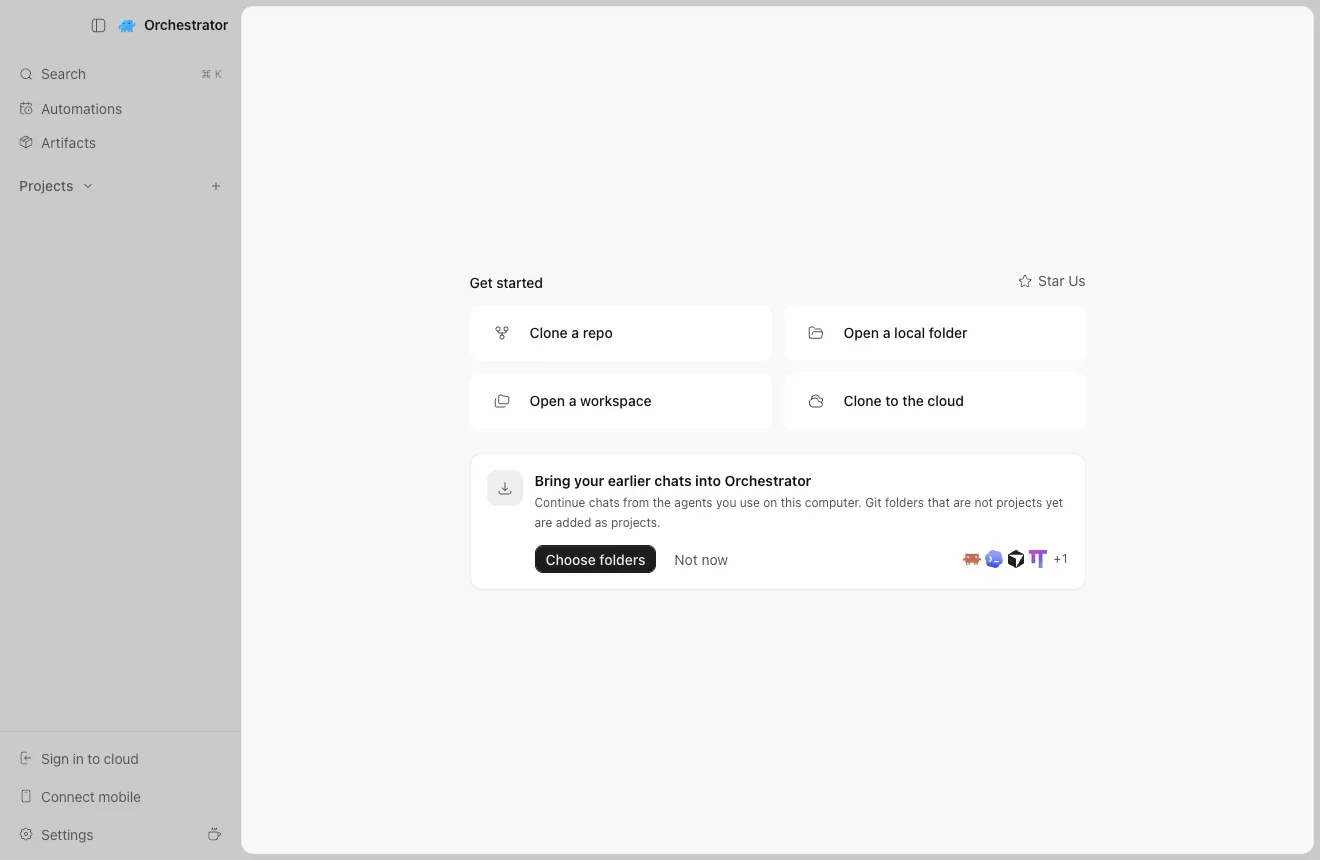
Open Orchestrator. On first launch, Home offers to bring in your earlier chats, and each folder you pick becomes a project with its chats from Conductor, Claude Code and Codex.
1
Click Choose folders
First launch: Home offers your earlier chats.
2
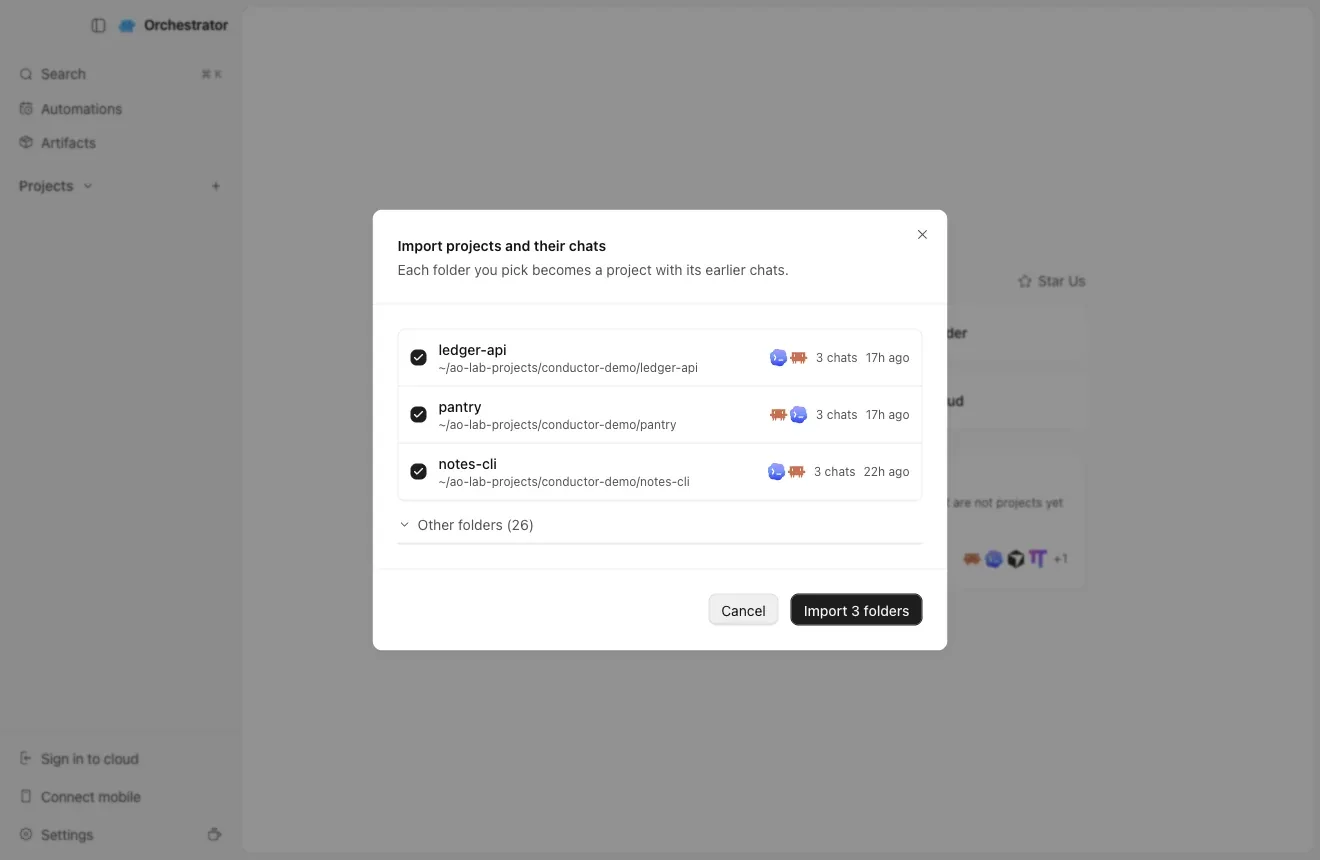
Tick the repositories you use in Conductor, then Import
Pick the repository folder itself, not a folder under ~/conductor/workspaces.
3
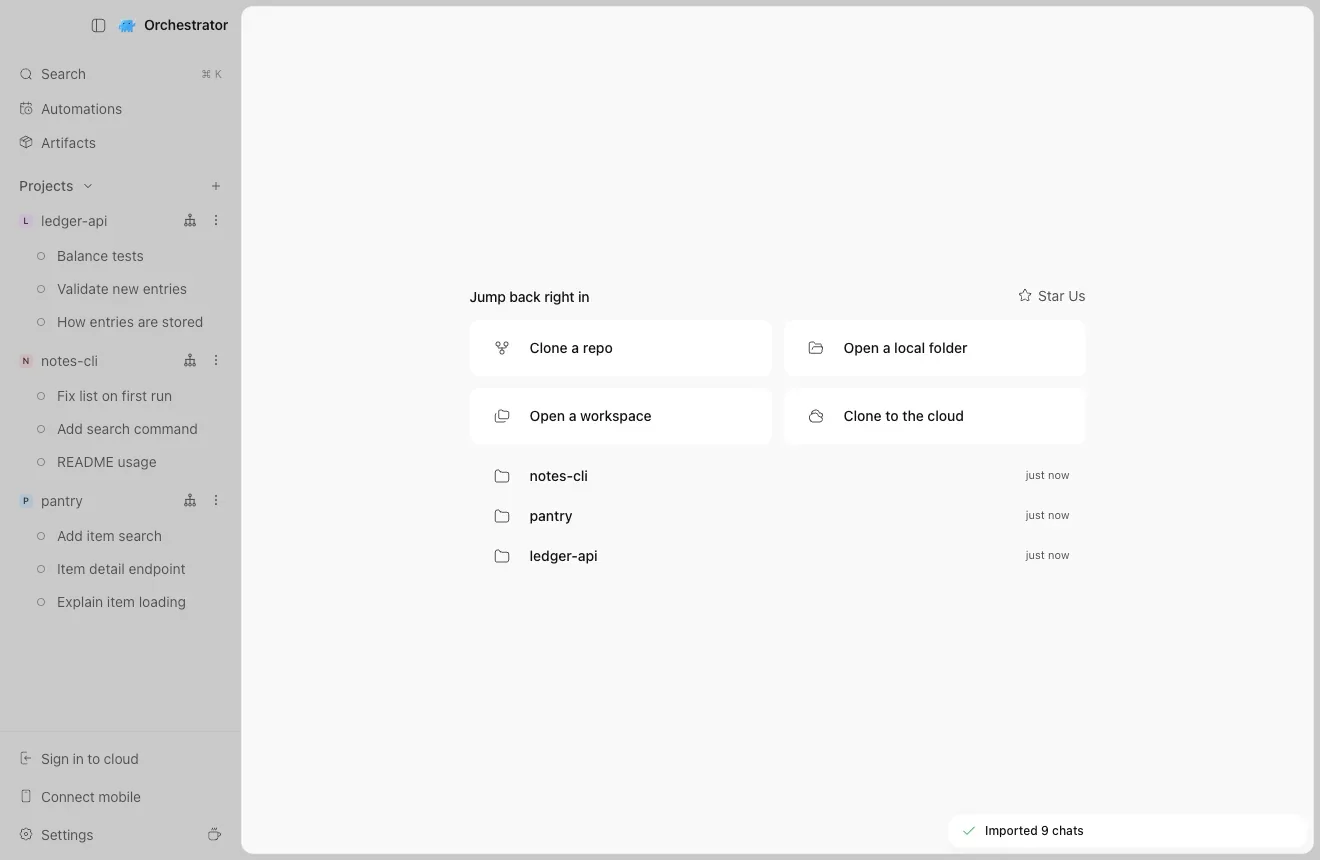
Your projects and chats are ready
Chats keep their Conductor titles.
Three repositories, nine chats.
4
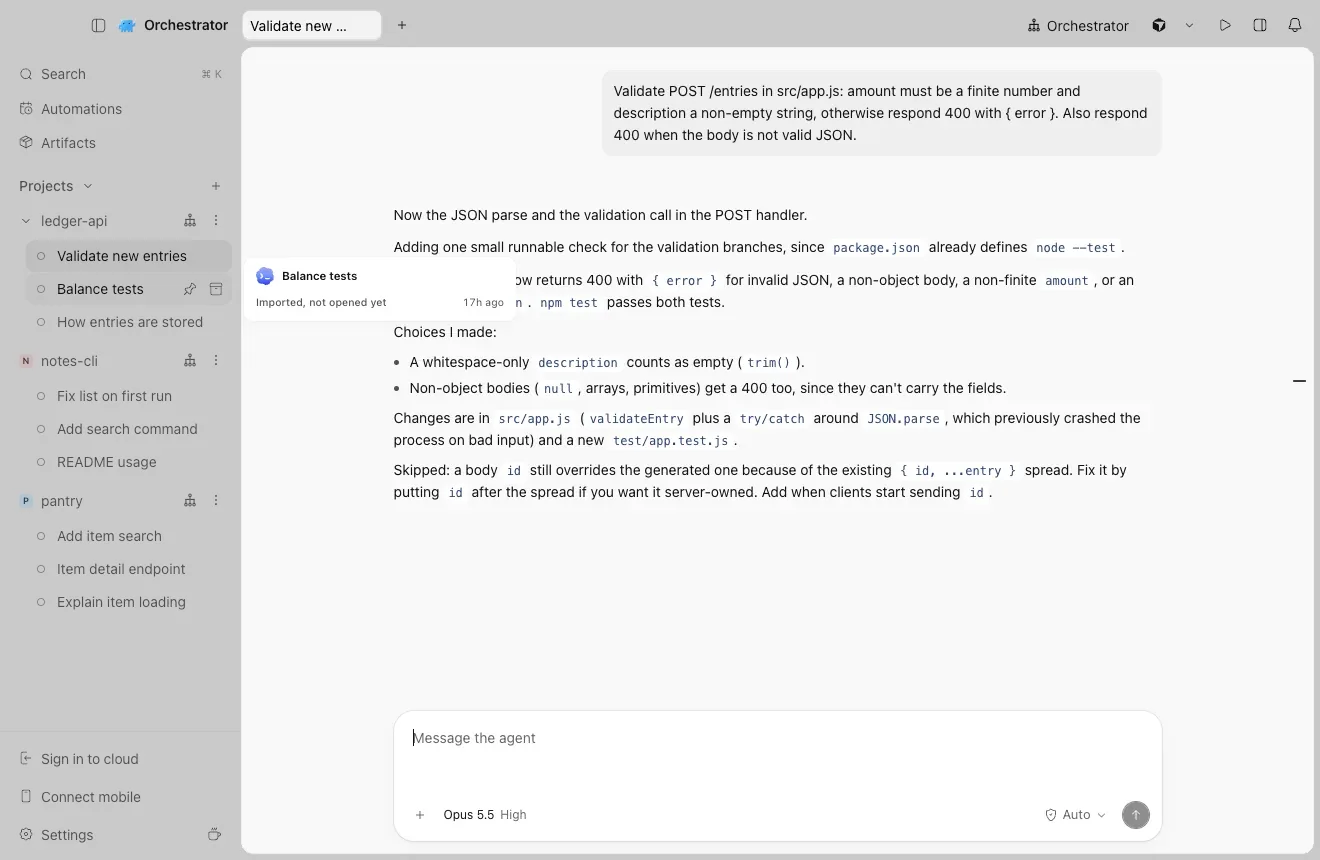
Open a chat and keep going
The full history is there. Type to continue: Claude Code and Codex pick up the same conversation.
An imported Claude Code chat from a Conductor workspace.
Before you archive a workspace in Conductor, import its chats and open each one once. The first open copies the workspace's uncommitted changes into the session.
“I already use Orchestrator. Where's the import?
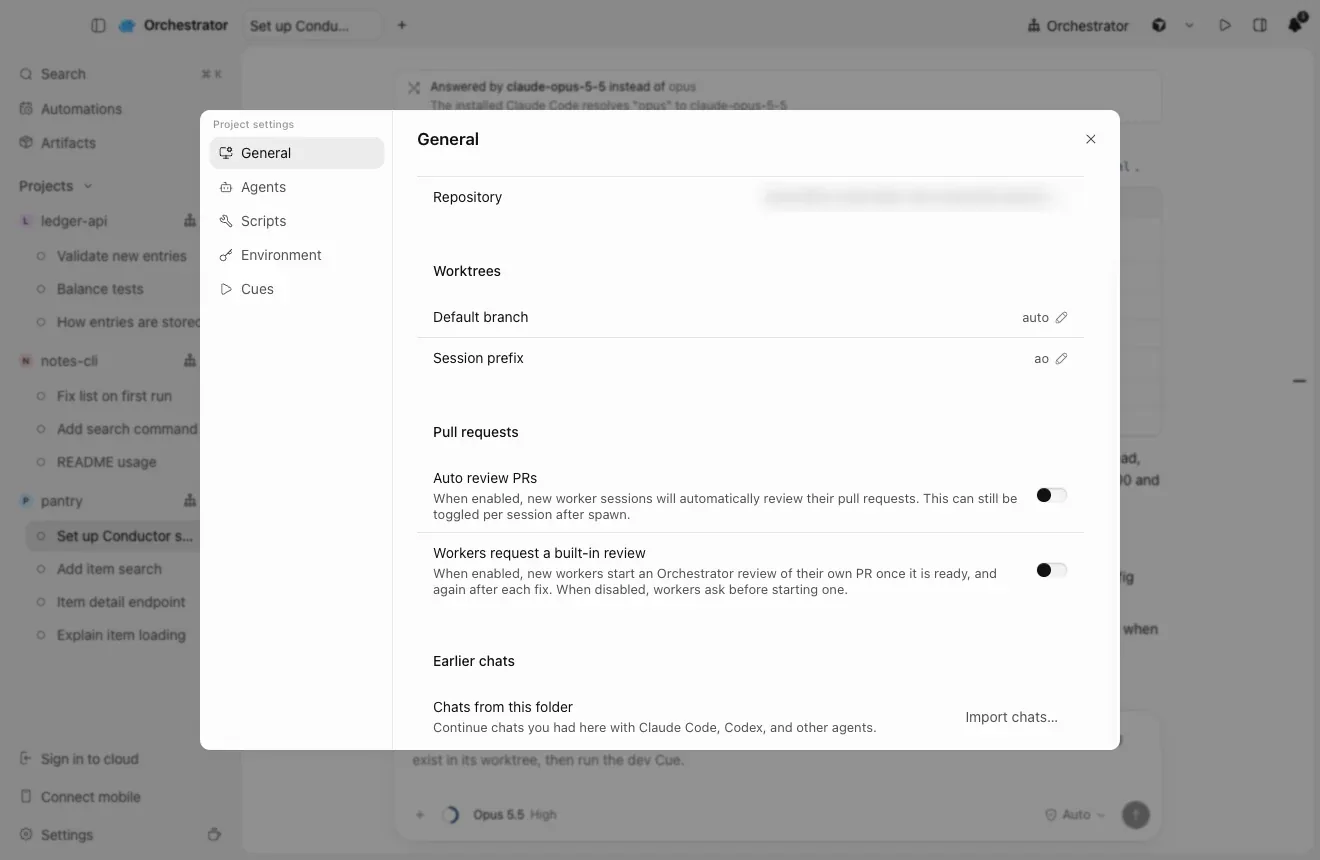
Open the project's Project settings → General, and under Earlier chats, choose Import chats…. To add a repository without chats, choose Open a local folder on Home.
1
Import chats into a project you already have
In OrchestratorProject settingsGeneralEarlier chatsImport chats…
“Which chats come over?
Your Claude Code and Codex chats from Conductor, however old.
Chats from archived workspaces and from workspace folders you deleted are included.
A Claude chat that Claude Code has no history for on your Mac, such as one transferred from Cloud, is rebuilt from Conductor's own history.
Not included: chats you deleted in Conductor, and Codex chats whose history Codex no longer has on your Mac.
03
Where do my scripts, env vars and settings go?
“What about my setup script, run buttons and environment variables?
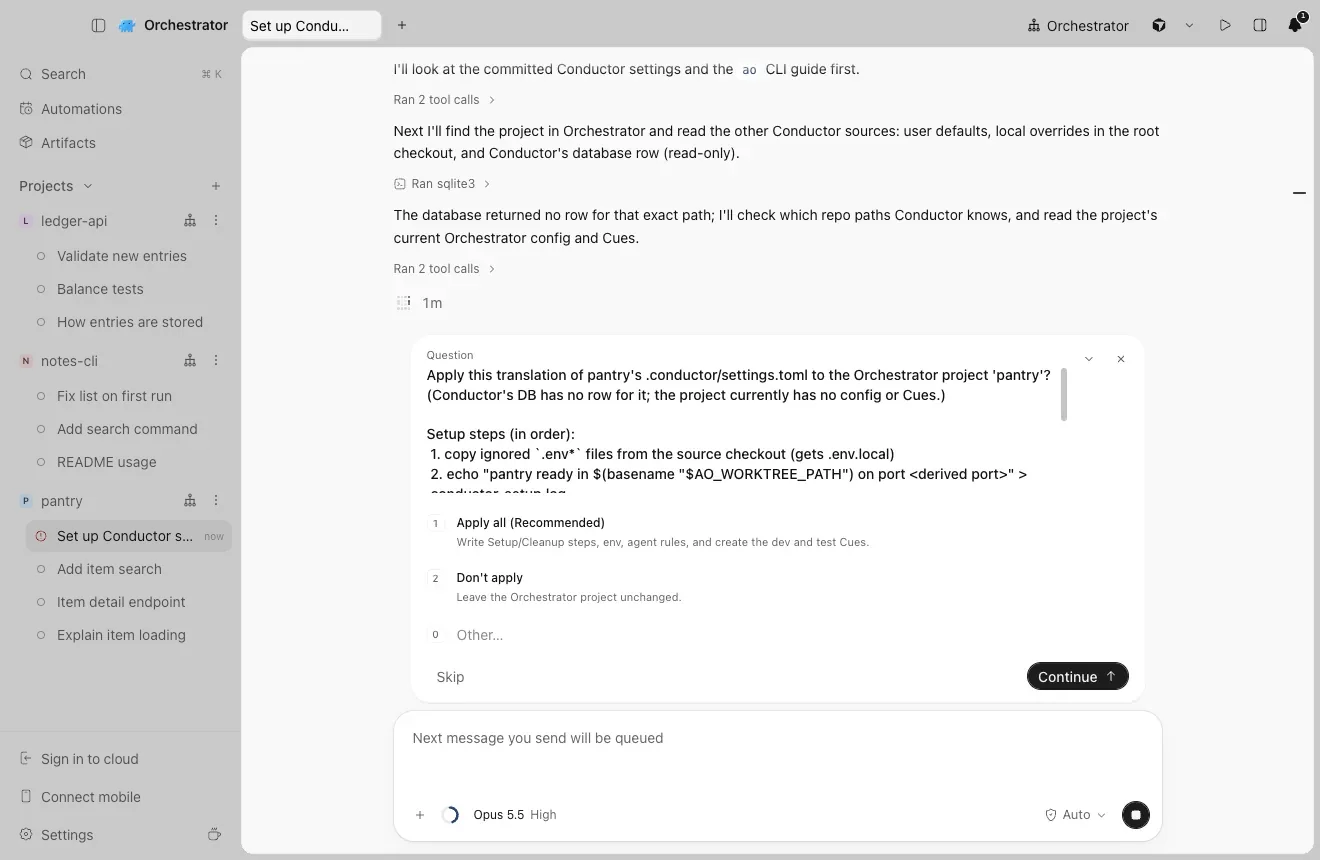
Ask your agent. Start a new chat in the project and send it the prompt below. It reads your Conductor settings, shows its plan, and changes nothing until you choose Apply.
New in nightlyWith the nightly build, one line is enough:
>Set up this project's Conductor settings in Orchestrator.
With the stable release, paste Move my Conductor setup. It spells out the same steps. Set up Orchestrator installs the desktop app for you.
>I'm moving this repository from Conductor to Orchestrator. Set up its Conductor settings in this Orchestrator project. Only read Conductor's files; never change them.
Show full prompt · paste into Claude Code, Codex or any coding agent
I'm moving this repository from Conductor to Orchestrator. Set up its Conductor settings in this Orchestrator project. Only read Conductor's files; never change them.

1. Run `ao project get $AO_PROJECT_ID --json` and `ao cue list --project $AO_PROJECT_ID --json`. Keep everything the project already has.

2. Read these, each later file overriding the earlier ones key by key: ~/.conductor/settings.toml (ignore models), conductor.json in the repository (only if .conductor/settings.toml is missing), .conductor/settings.toml, .conductor/settings.local.toml.

3. Map each setting:
   - scripts.setup -> a Setup step (--post-create)
   - scripts.archive -> a Cleanup step (--pre-remove)
   - each scripts.run action -> a command Cue: ao cue create --project $AO_PROJECT_ID --name <name> --command '<command and its args>' (when cwd is set, work out any port first, then add "cd -- <options.cwd> &&"; skip hidden actions)
   - environment_variables -> --env KEY=VALUE
   - prompts.general -> --agent-rules
   - the ignored files Conductor copies into each workspace (.worktreeinclude, else file_include_globs, else .env*) -> a first Setup step that copies them from "$AO_SOURCE_TREE_PATH" into the new worktree
   - anything else (cloud variables, git branch naming, run mode, other prompts) -> skip it and tell me

4. Orchestrator doesn't set CONDUCTOR_* variables. In Setup and Cleanup steps, replace $CONDUCTOR_ROOT_PATH with $AO_SOURCE_TREE_PATH, $CONDUCTOR_WORKSPACE_PATH with $AO_WORKTREE_PATH and $CONDUCTOR_WORKSPACE_NAME with $(basename "$AO_WORKTREE_PATH"). In a Cue, start the command with WT_ROOT=$PWD (the worktree root) before any cd, and use $WT_ROOT for the workspace path; if the action or the project environment already uses WT_ROOT or WT_PORT, pick other names. Replace $CONDUCTOR_DEFAULT_BRANCH with the branch name written out (the project's default branch; ask me if a command means another one). Replace $CONDUCTOR_PORT with a port worked out from the worktree root: in a Cue, also set WT_PORT=$((10000 + $(printf %s "$WT_ROOT" | cksum | cut -d' ' -f1) % 2270 * 10)) before any cd, and use $WT_PORT where the command used $CONDUCTOR_PORT; in a step, use the same expression with "$AO_WORKTREE_PATH". Both then give the same port for a worktree.

5. Show me the plan first: the Setup and Cleanup steps, Cues, variable names (not their values), agent rules and what you skip. Wait for my OK.

6. --post-create, --pre-remove and --env replace the whole list and --agent-rules the whole text, so pass the existing values together with the new ones in one `ao project set-config $AO_PROJECT_ID` call. Then create the Cues, and tell me to check Project settings -> Scripts, Environment and Cues.
1
The agent shows its plan first
It reads .conductor/settings.toml, settings.local.toml, conductor.json, ~/.conductor/settings.toml and the scripts saved in the Conductor app. Nothing changes until you choose Apply.
Setup and Cleanup steps, Cues, variables and agent rules, plus what it skips.
2
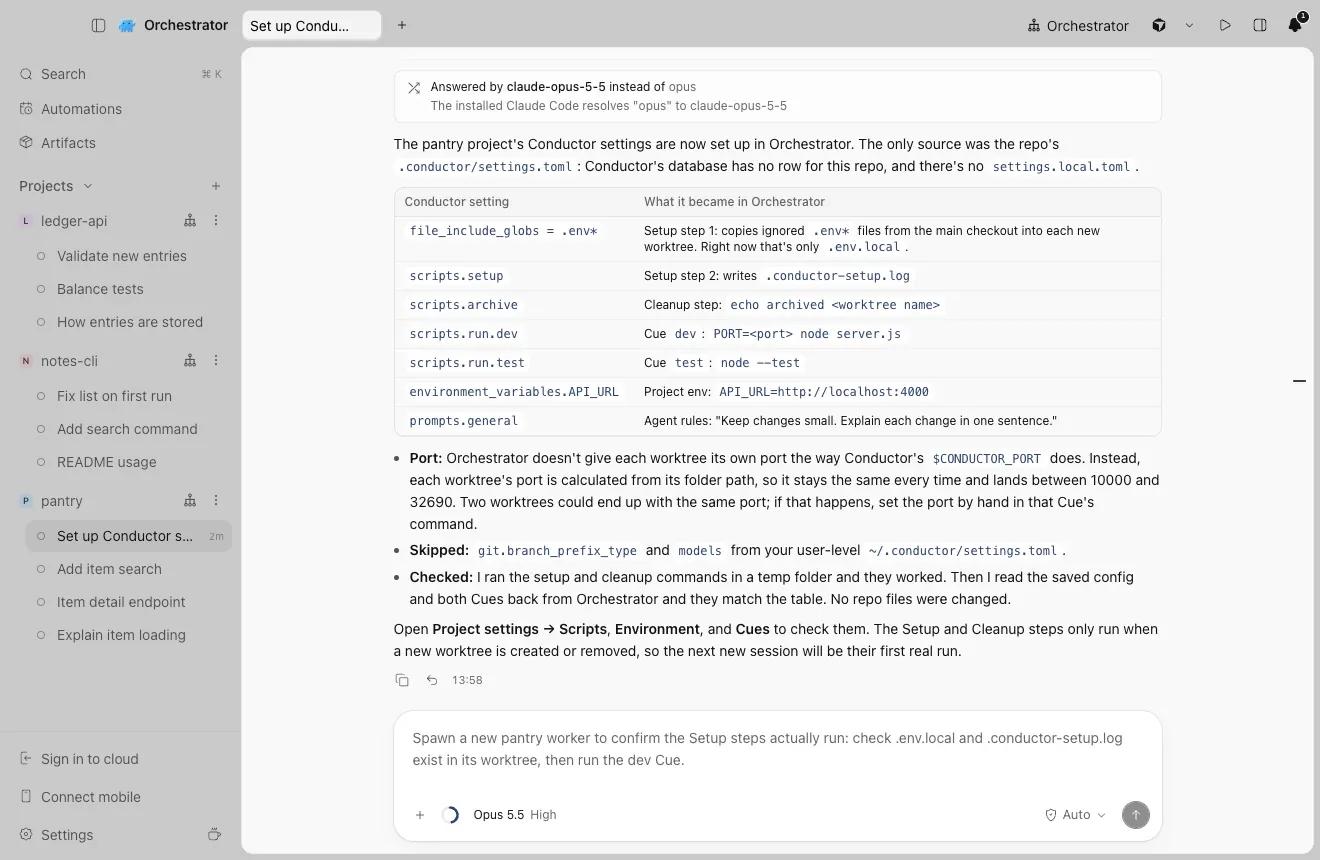
It applies the plan and sums it up
Each Conductor setting and what it became.
3
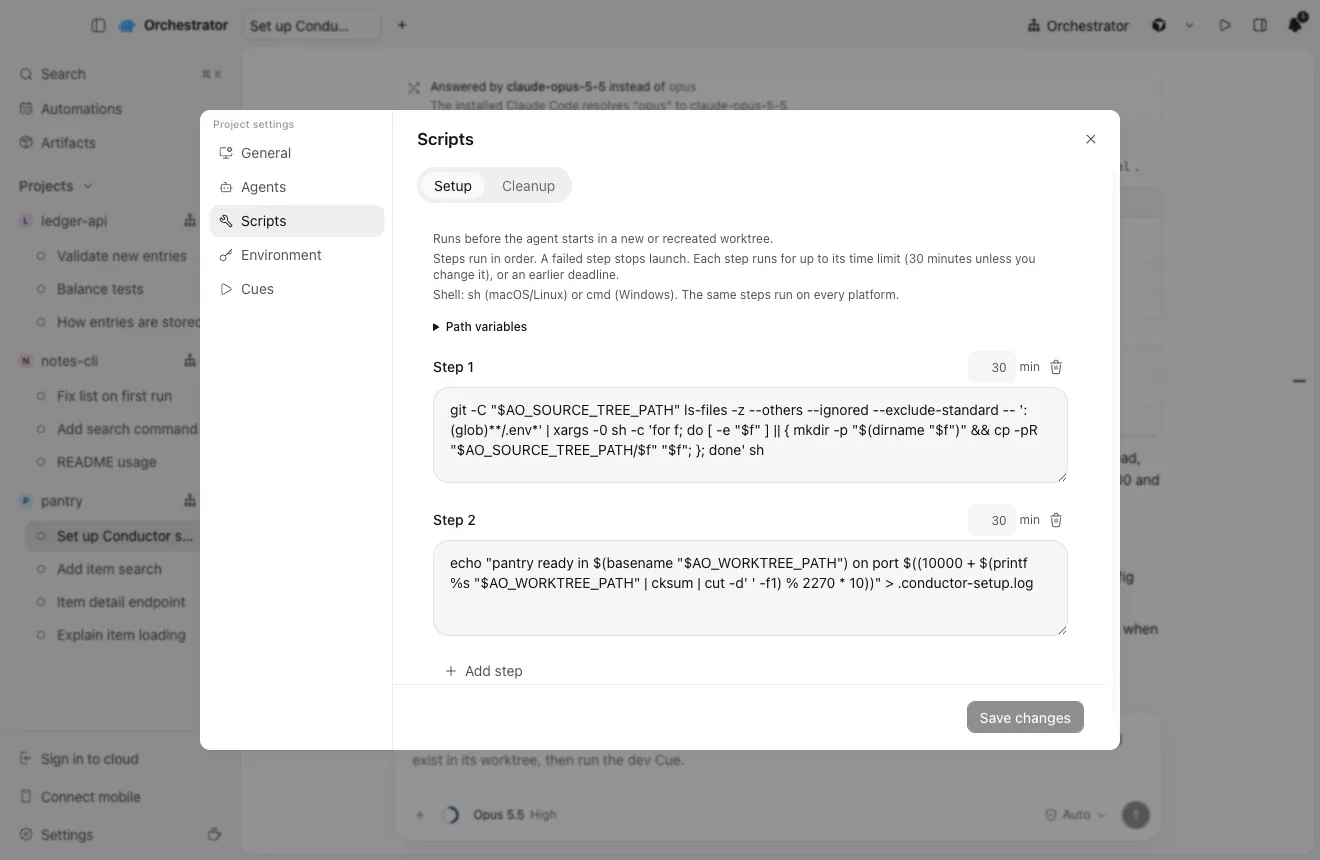
Check the result in Project settings
In OrchestratorProject settingsScripts · Environment · Cues
“Where does each Conductor setting go?
Setup and archive scripts become Setup and Cleanup steps, each run action becomes a command Cue, environment variables go to the project's Environment, and the general prompt becomes agent rules.
A Setup step that copies them into each new worktree
“My scripts use $CONDUCTOR_PORT and $CONDUCTOR_WORKSPACE_PATH.
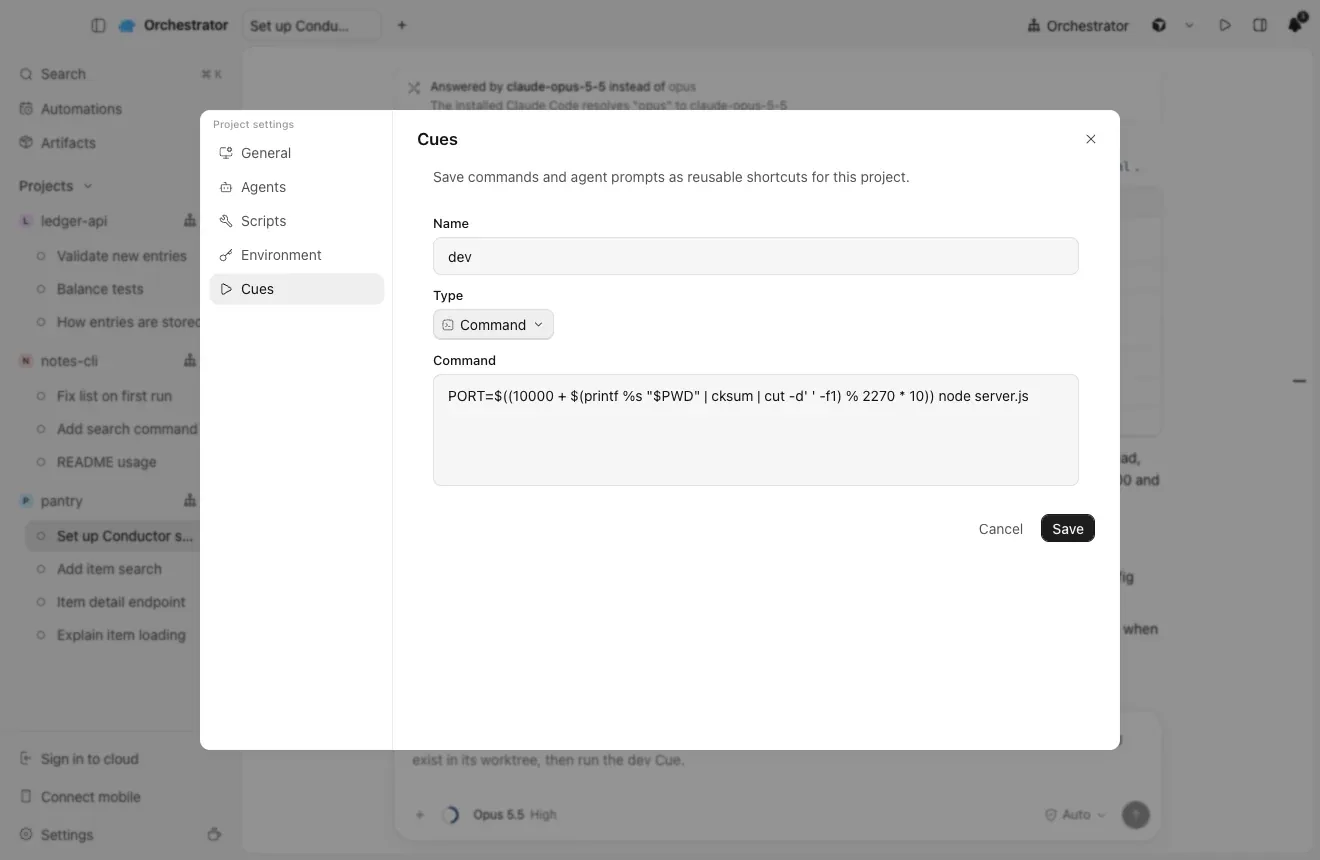
Orchestrator doesn't set the CONDUCTOR_* variables, so the agent rewrites them. $CONDUCTOR_WORKSPACE_PATH becomes $AO_WORKTREE_PATH. For $CONDUCTOR_PORT, it works out a fixed port from the worktree's folder, as in the dev Cue below. If two worktrees get the same port, set the port by hand in that command.
In Conductor
In Orchestrator
$CONDUCTOR_ROOT_PATH
$AO_SOURCE_TREE_PATH in Setup and Cleanup steps
$CONDUCTOR_WORKSPACE_PATH
$AO_WORKTREE_PATH in steps, $PWD in a Cue
$CONDUCTOR_WORKSPACE_NAME
$(basename "$AO_WORKTREE_PATH")
$CONDUCTOR_PORT
A fixed port worked out from the worktree's folder
$CONDUCTOR_DEFAULT_BRANCH
The project's default branch, written out
1
A Cue with a port worked out from the folder
04
How do I keep Cloud work running?
“What about the work I had in Conductor Cloud?
Create a Cloud project from the same GitHub repository, copy your Cloud settings into it, and start a session on each branch you pushed.
1
Create a Cloud project from the same GitHub repository
In OrchestratorSign in to cloudClone to the cloud
Sign in to Orchestrator, then choose Clone to the cloud. Each session gets its own remote workspace, as in Conductor Cloud.
Sign in to cloud is at the bottom of the sidebar.
2
Copy your Cloud settings into Project settings by hand
Use $AO_WORKTREE_PATH in place of $CONDUCTOR_ROOT_PATH and $CONDUCTOR_WORKSPACE_PATH, and $AO_SESSION_ID in place of $CONDUCTOR_WORKSPACE_NAME. Conductor Cloud ran Amazon Linux, so check commands like dnf install.
3
Pick up where you left off
Start a session on each branch you pushed. For workspaces you transferred to your Mac, import their chats as in section 02. A chat still in Conductor Cloud can't be continued, so keep the export.
Where each Conductor Cloud setting goes
In Conductor Cloud
In Project settings
Cloud Computer install script, then the repository's setup script
Scripts → Setup
Archive script
Scripts → Cleanup
Cloud environment variables and secrets
Environment
Run actions
Cues, one each
General prompt
Instructions
“What does Orchestrator Cloud give me?
Orchestrator Cloud runs your agents in cloud sandboxes, so work goes on after you close your laptop. It is its own product, not a copy of Conductor Cloud.
Agents keep running with your laptop closed
Each cloud session runs in its own sandbox on Freestyle or Coder, including your own Coder deployment. Idle sandboxes pause and resume when you come back.
Your agents, without your logins in the sandbox
Claude Code, Codex, Cursor and OpenCode run in the cloud. Agent sign-ins are held by Orchestrator's servers and models are reached through a proxy, so long-lived logins never sit in the sandbox.
An orchestrator in the cloud
It starts, messages and stops worker sessions and opens their pull requests, while you are away.
From issue to merge
Matching GitHub issues can start worker sessions. Automatically fix CI failures and Automatically fix review comments keep PRs moving, and merge requests wait for Approve and merge or Reject.
Your setup, in the cloud too
The same Setup and Cleanup scripts run in cloud sandboxes, and a project can span several repositories, or none.
“We shared chats in Conductor, and I use the iOS app.
Orchestrator Cloud sessions can be shared with teammates, the Orchestrator mobile app for iOS and Android connects to your computer, and Automations run sessions on a schedule.
In Conductor
In Orchestrator
Shared chats and presence
Share session, to watch or write, or share the whole project. Teammates find it under Shared with you. The Share button is in the header of a Cloud session once you're signed in.
Reassign to
Request turn and Take over, inside a shared chat
iOS app
Connect mobile, with the Orchestrator app for iOS or Android
Routines
Automations
Sharing is for Orchestrator Cloud sessions and needs everyone signed in to Orchestrator.
1
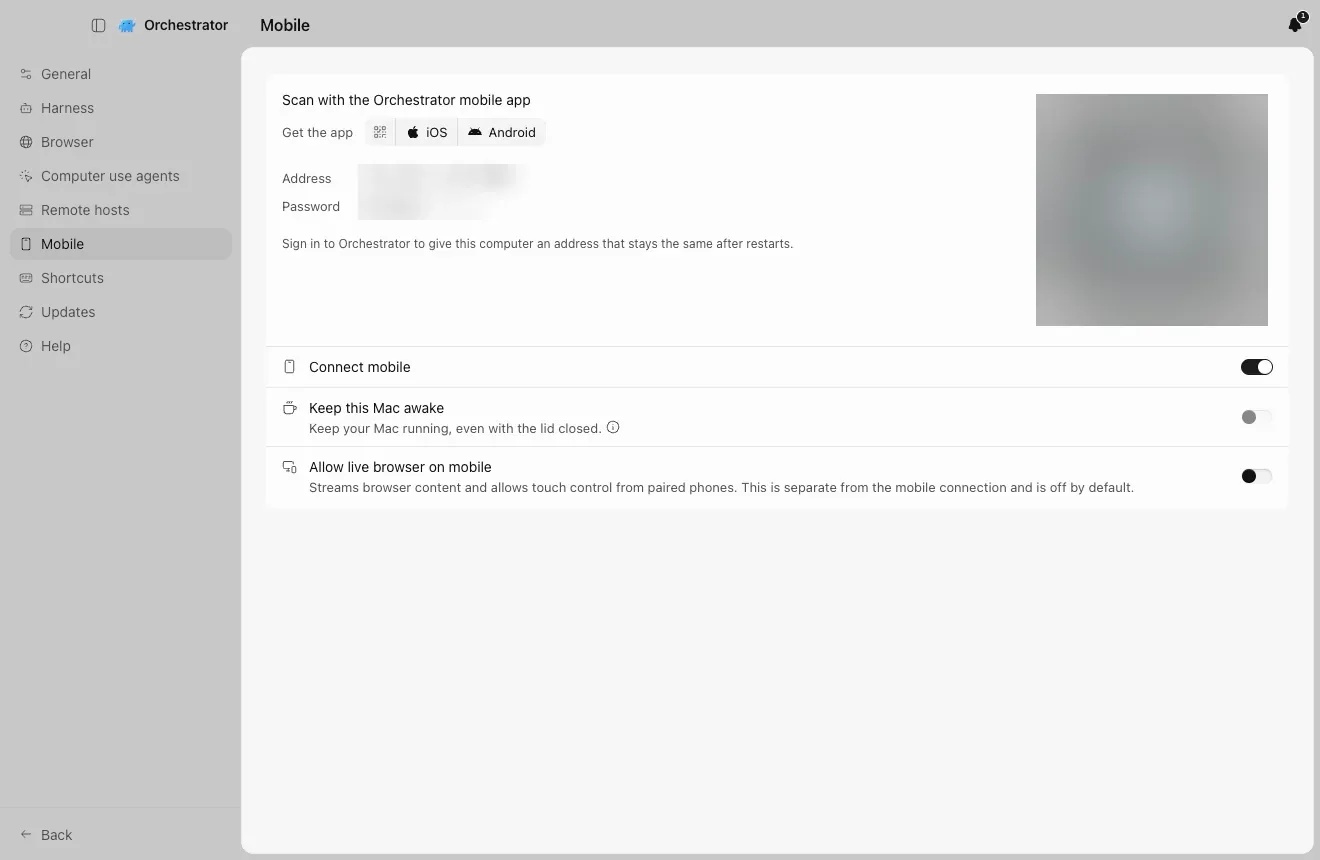
iOS app: Connect mobile
Click Connect mobile in the sidebar and scan the code with the Orchestrator mobile app for iOS or Android.
The code, address and password are blurred in this screenshot.
2
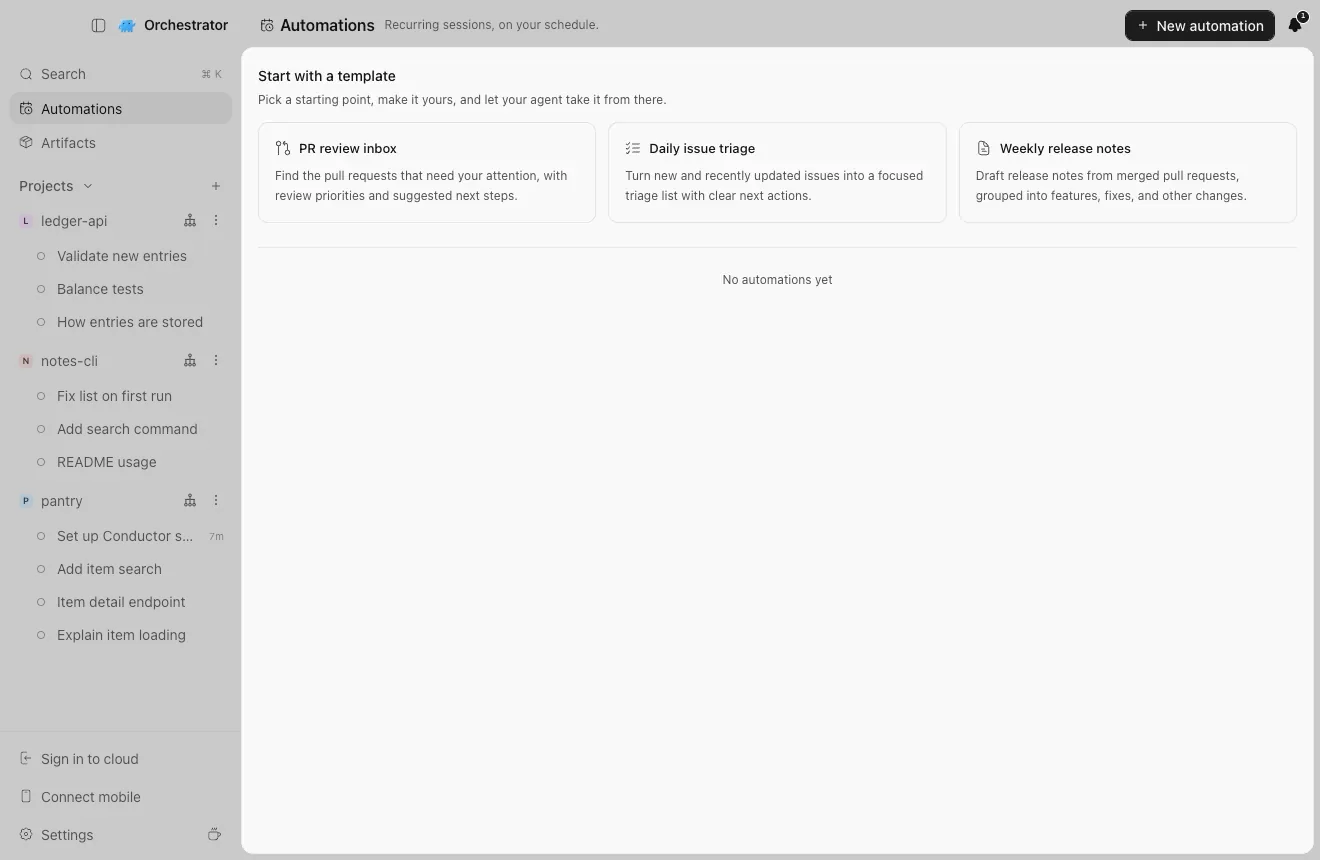
Routines: Automations
Recurring sessions on your schedule. Start from a template or New automation.
Automations is in the sidebar.
06
Quick answers
Is Conductor shutting down?
Conductor announced on November 4, 2026 that it is joining Meta. Conductor Cloud becomes read-only on November 13 and shuts down on November 20, 2026. The local Mac app keeps working for now and starts winding down in early 2027.
When does Conductor Cloud shut down, and what happens to my data?
Conductor Cloud goes read-only on Friday, November 13, 2026, and shuts down on Friday, November 20, when Conductor starts deleting Cloud data. Push your branches, transfer the workspaces you want to keep and export your data before November 13.
Can I import my Conductor chats?
Yes, on the Mac. Orchestrator imports your Claude Code and Codex chats from Conductor, however old, and each one becomes a session you can continue. A Codex chat is left out if Codex no longer has its history on your Mac. Chat import is new in the nightly build.
How do I move my Conductor setup scripts and environment variables?
Send your agent the prompt on this page. It reads your Conductor settings and shows a plan. After you agree, setup and archive scripts become Setup and Cleanup steps, run actions become Cues, and environment variables go to the project's Environment.
Does Orchestrator run on Windows and Linux?
Yes. Orchestrator runs on macOS, Windows and Linux. Conductor chat import is for the Mac, like Conductor itself, so on Windows or Linux set up the same repositories and continue your pushed branches.
Is Orchestrator free and open source?
The desktop app is free and open source (Apache-2.0), with unlimited local agents. Orchestrator Cloud is Starter at $20/month or Pro at $40/month, and Enterprise is priced on request. Reaching your computer from your phone away from home through the managed HTTPS tunnel needs Starter or above.
Does Orchestrator change my Conductor files?
No. It only reads Conductor's files and database. The agent that sets up your settings only reads them too.
Do my Conductor workspaces move?
No. Orchestrator creates its own worktree and branch for each session, so your Conductor workspaces stay where they are.
What does the agent skip?
Settings that have no local equivalent, such as Cloud-only variables, Git branch naming, run mode and Conductor's model choices. It lists each one it skips before you apply.
Is Orchestrator a Claude wrapper?
No. It runs 38 coding agents through the CLIs you already have installed and signed in, and usage is billed by your own provider account.
Orchestrator screenshots taken on November 11, 2026 from a demo Conductor database with three repositories and nine Claude Code and Codex chats. The Conductor menu paths come from Conductor's 0.93.0 changelog.